|
Deriving 4D relativistic Lorentz transformations
Freddy Baudine(1), Edgardo S. Cheb-Terrab(2)
(1) Retired, passionate about Mathematics and Physics
(2) Physics, Differential Equations and Mathematical Functions, Maplesoft
Lorentz transformations are a six-parameter family of linear transformations  that relate the values of the coordinates that relate the values of the coordinates  of an event in one inertial reference system to the coordinates of an event in one inertial reference system to the coordinates  of the same event in another inertial system that moves at a constant velocity relative to the former. An explicit form of of the same event in another inertial system that moves at a constant velocity relative to the former. An explicit form of  can be derived from physics principles, or in a purely algebraic mathematical manner. A derivation from physics principles is done in an upcoming post about relativistic dynamics, while in this post we derive the form of can be derived from physics principles, or in a purely algebraic mathematical manner. A derivation from physics principles is done in an upcoming post about relativistic dynamics, while in this post we derive the form of  mathematically, as rotations in a (pseudo) Euclidean 4 dimensional space. Most of the presentation below follows the one found in Jackson's book on Classical Electrodynamics [1]. mathematically, as rotations in a (pseudo) Euclidean 4 dimensional space. Most of the presentation below follows the one found in Jackson's book on Classical Electrodynamics [1].
The computations below in Maple 2022 make use of the Maplesoft Physics Updates v.1283 or newer.
| |
Formulation of the problem and ansatz 
|
| |
The problem is to find a group of linear transformations,
!["x^(' mu)=(Lambda^( mu))[nu] x^(nu)"](/view.aspx?sf=218129_post/1a98fef9be7541258bed9fcdc5cadd70.gif)
that represent rotations in a 4D (pseudo) Euclidean spacetime, and so they leave invariant the norm of the 4D position vector  ; that is, ; that is,
!["x^(' mu) (x')[mu]=x^( mu) (x^())[mu]"](/view.aspx?sf=218129_post/33ea6ee43d8b8655247645dddd8b688c.gif)
For the purpose of deriving the form of  , a relevant property for it can be inferred by rewriting the invariance of the norm in terms of , a relevant property for it can be inferred by rewriting the invariance of the norm in terms of  . In steps, from the above, . In steps, from the above,
!["g[alpha,beta] x^(' alpha) (x^(' beta))[]=g[mu,nu] x^( mu) (x^( nu))[]"](/view.aspx?sf=218129_post/1cd31150ffe1bc163133d851adb498cd.gif)
![g[alpha, beta]*`#msubsup(mi("Λ",fontstyle = "normal"),mi("μ",fontstyle = "normal"),mrow(mo("⁢"),mi("α",fontstyle = "normal")))`*x^mu*`#msubsup(mi("Λ",fontstyle = "normal"),mi("ν",fontstyle = "normal"),mrow(mo("⁢"),mi("β",fontstyle = "normal")))`*x^nu = g[mu, nu]*x^mu*`#msup(mi("x"),mrow(mo("⁢"),mi("ν",fontstyle = "normal")))`](/view.aspx?sf=218129_post/0f9bb49ac58642dffbadc3772805a34a.gif)
![g[alpha, beta]*`#msubsup(mi("Λ",fontstyle = "normal"),mi("μ",fontstyle = "normal"),mrow(mo("⁢"),mi("α",fontstyle = "normal")))`*x^mu*`#msubsup(mi("Λ",fontstyle = "normal"),mi("ν",fontstyle = "normal"),mrow(mo("⁢"),mi("β",fontstyle = "normal")))`*x^nu = g[mu, nu]*x^mu*`#msup(mi("x"),mrow(mo("⁢"),mi("ν",fontstyle = "normal")))`](/view.aspx?sf=218129_post/163c9c9c4634c14fd26728c976bcd5a8.gif)
from where,
![g[alpha, beta]*`#msubsup(mi("Λ",fontstyle = "normal"),mi("μ",fontstyle = "normal"),mrow(mo("⁢"),mi("α",fontstyle = "normal")))`*`#msubsup(mi("Λ",fontstyle = "normal"),mi("ν",fontstyle = "normal"),mrow(mo("⁢"),mi("β",fontstyle = "normal")))` = g[mu, nu]](/view.aspx?sf=218129_post/2c0b521574871c7768f4cf8ee3ce67f4.gif) 
or in matrix (4 x 4) form,  , , ![`≡`(g[alpha, beta], g)](/view.aspx?sf=218129_post/d8347e9a5fd46f59469e3e1ce68f004e.gif)

where  is the transpose of is the transpose of  . Taking the determinant of both sides of this equation, and recalling that . Taking the determinant of both sides of this equation, and recalling that 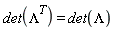 , we get , we get

The determination of  is analogous to the determination of the matrix is analogous to the determination of the matrix  (3D tensor (3D tensor ![R[i, j]](/view.aspx?sf=218129_post/d3a11e84066f84ce97ff3dc110f01303.gif) ) representing rotations in the 3D space, where the same line of reasoning leads to ) representing rotations in the 3D space, where the same line of reasoning leads to  . To exclude reflection transformations, that have . To exclude reflection transformations, that have  and cannot be obtained through any sequence of rotations, because they do not preserve the relative orientation of the axes, the sign that represents our problem is +. To explicitly construct the transformation matrix and cannot be obtained through any sequence of rotations, because they do not preserve the relative orientation of the axes, the sign that represents our problem is +. To explicitly construct the transformation matrix  , Jackson proposes the ansatz , Jackson proposes the ansatz

Summarizing: the determination of  consists of determining consists of determining ![`𝕃`[nu]^mu](/view.aspx?sf=218129_post/0470fa00f3d196199773ab8db8069eef.gif) entering entering  such that such that  followed by computing the exponential of the matrix followed by computing the exponential of the matrix  . .
|
| |
Determination of ![`𝕃`[nu]^mu](/view.aspx?sf=218129_post/58c84336a1c8bfe9001e893f5210dc6f.gif)
|
| |
In order to compare results with Jackson's book, we use the same signature he uses,  , and lowercase Latin letters to represent space tensor indices, while spacetime indices are represented using Greek letters, which is already Physics' default. , and lowercase Latin letters to represent space tensor indices, while spacetime indices are represented using Greek letters, which is already Physics' default.


|
![[signature = `+ - - -`, spaceindices = lowercaselatin]](/view.aspx?sf=218129_post/bb9ff98b88efa708398b47df7af35c21.gif)
|
(1) |
Start by defining the tensor ![`𝕃`[nu]^mu](/view.aspx?sf=218129_post/f3e7a1591939feb7d27fbca6a85ad3fb.gif) whose components are to be determined. For practical purposes, define a macro whose components are to be determined. For practical purposes, define a macro  to represent the tensor and use to represent the tensor and use  to represent its components to represent its components

![LM[`~mu`, nu] = Matrix(4, symbol = L)](/view.aspx?sf=218129_post/e35f901f1fe111f31c9f18d72eb46050.gif)
|
![`𝕃`[`~mu`, nu] = Matrix(%id = 36893488153289603060)](/view.aspx?sf=218129_post/a7e632f5647a47c76b453a934ef403de.gif)
|
(2) |

|
![{Lambda, `𝕃`[`~mu`, nu], Physics:-Dgamma[mu], Physics:-Psigma[mu], Physics:-d_[mu], Physics:-g_[mu, nu], Physics:-gamma_[a, b], Physics:-LeviCivita[alpha, beta, mu, nu]}](/view.aspx?sf=218129_post/0e63db83cacf1bd21a54118dca10737d.gif)
|
(3) |
Next, from  (see above in Formulation of the problem) one can derive the form of . To work algebraically with (see above in Formulation of the problem) one can derive the form of . To work algebraically with  representing matrices, set these symbols as noncommutative representing matrices, set these symbols as noncommutative

|
![[noncommutativeprefix = {`𝕃`, Lambda, g}]](/view.aspx?sf=218129_post/792ea974c79ebc122cbf99d19032d0e8.gif)
|
(4) |
From

|

|
(5) |
it follows that
, g, Lambda) = g))/Lambda](/view.aspx?sf=218129_post/79c1a4090fd65ea57d6e54aef1ba64a0.gif)
|

|
(6) |
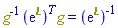
, Physics[`^`](Lambda, T), g) = Physics[`^`](Lambda, -1), Lambda = exp(LM))](/view.aspx?sf=218129_post/91f3c72a86da53ae615ed007bdbb3be6.gif)
|
|
(7) |
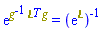
Expanding the exponential using  , and taking into account that the matrix product , and taking into account that the matrix product  can be rewritten as can be rewritten as , the left-hand side of (7) can be written as , the left-hand side of (7) can be written as 
, Physics[`^`](exp(`𝕃`), T), g) = Physics[`^`](exp(`𝕃`), -1))](/view.aspx?sf=218129_post/a4006fddfac33e919df691332da3bc94.gif)
|
|
(8) |
Multiplying by 
, Physics[`^`](`𝕃`, T), g)) = Physics[`^`](exp(`𝕃`), -1))*exp(LM)](/view.aspx?sf=218129_post/fb9453a2c720f5ed02d7b32223d0610f.gif)
|

|
(9) |
Recalling that !["g^(-1)=g[]^(mu,alpha)"](/view.aspx?sf=218129_post/0e48596302f6d094fb4bf2ec67c3a561.gif) , , ![g = g[beta, nu]](/view.aspx?sf=218129_post/9ad6653fb1073e420f62132a84a9cd2f.gif) and that for any matrix and that for any matrix  , , !["(`𝕃`^T)[alpha]^( beta)= `𝕃`(( )^(beta))[alpha]"](/view.aspx?sf=218129_post/0911a12f568f62725e96b23f297b0c87.gif) , ,
!["g^(-1) `𝕃`^T g= 'g_[~mu,~alpha]*LM[~beta, alpha] g_[beta, nu] '"](/view.aspx?sf=218129_post/251d6947ef08ed2ec4e90021e8b04580.gif)
|
![Physics:-`*`(Physics:-`^`(g, -1), Physics:-`^`(`𝕃`, T), g) = Physics:-`*`(Physics:-g_[`~mu`, `~alpha`], `𝕃`[`~beta`, alpha], Physics:-g_[beta, nu])](/view.aspx?sf=218129_post/691de729291879e5f0971abc27747816.gif)
|
(10) |
, Physics[`^`](`𝕃`, T), g) = Physics[`*`](Physics[g_][`~mu`, `~alpha`], `𝕃`[`~beta`, alpha], Physics[g_][beta, nu]), LM = LM[`~mu`, nu]], Physics[`*`](exp(Physics[`*`](Physics[`^`](g, -1), Physics[`^`](`𝕃`, T), g)), exp(`𝕃`)) = 1)](/view.aspx?sf=218129_post/9acde12d0e2bad905afa5f39b19bf9f4.gif)
|
![Physics:-`*`(exp(Physics:-g_[`~alpha`, `~mu`]*Physics:-g_[beta, nu]*`𝕃`[`~beta`, alpha]), exp(`𝕃`[`~mu`, nu])) = 1](/view.aspx?sf=218129_post/eb46310c5392c8731c4d82c636020d51.gif)
|
(11) |
To allow for the combination of the exponentials, now that everything is in tensor notation, remove the noncommutative character of  

|
![[noncommutativeprefix = none]](/view.aspx?sf=218129_post/4e7429e19310eb7232e07202148d7e1c.gif)
|
(12) |
, exp(`𝕃`[`~mu`, nu])) = 1)](/view.aspx?sf=218129_post/6473f7746686afb7939e0ce3a5a5b200.gif)
|
![exp(`𝕃`[`~beta`, alpha]*Physics:-g_[beta, nu]*Physics:-g_[`~alpha`, `~mu`]+`𝕃`[`~mu`, nu]) = 1](/view.aspx?sf=218129_post/37a581506489ab61ae7d813485a8743a.gif)
|
(13) |
Since every tensor component of this expression is real, taking the logarithm at both sides and simplifying tensor indices
![`assuming`([map(ln, exp(`𝕃`[`~beta`, alpha]*Physics[g_][beta, nu]*Physics[g_][`~alpha`, `~mu`]+`𝕃`[`~mu`, nu]) = 1)], [real])](/view.aspx?sf=218129_post/2341f3f3429a9fe295435403a58c0db4.gif)
|
![`𝕃`[`~beta`, alpha]*Physics:-g_[beta, nu]*Physics:-g_[`~alpha`, `~mu`]+`𝕃`[`~mu`, nu] = 0](/view.aspx?sf=218129_post/99e340e549bcf43b6a6652f2a692eb02.gif)
|
(14) |
![Simplify(`𝕃`[`~beta`, alpha]*Physics[g_][beta, nu]*Physics[g_][`~alpha`, `~mu`]+`𝕃`[`~mu`, nu] = 0)](/view.aspx?sf=218129_post/8a07a538586d33b1bc9cd8377ed651b1.gif)
|
![`𝕃`[nu, `~mu`]+`𝕃`[`~mu`, nu] = 0](/view.aspx?sf=218129_post/49641816a9a142c410d2f49b5156e699.gif)
|
(15) |
So the components of ![`𝕃`[`~mu`, nu]](/view.aspx?sf=218129_post/ea1f9710419423a78b833e6ab67c8984.gif)
![LM[`~μ`, nu, matrix]](/view.aspx?sf=218129_post/28e47c99ae9c9b8d737394cf0be5fa7c.gif)
|
![`𝕃`[`~μ`, nu] = Matrix(%id = 36893488151939882148)](/view.aspx?sf=218129_post/90b618e7db37311a30cd87237740de97.gif)
|
(16) |
satisfy (15). Using TensorArray the components of that tensorial equation are
![TensorArray(`𝕃`[nu, `~mu`]+`𝕃`[`~mu`, nu] = 0, output = setofequations)](/view.aspx?sf=218129_post/176e49cb0d51e6357a7a4a57f0fb0da2.gif)
|
![{2*L[1, 1] = 0, 2*L[2, 2] = 0, 2*L[3, 3] = 0, 2*L[4, 4] = 0, -L[1, 2]+L[2, 1] = 0, L[1, 2]-L[2, 1] = 0, -L[1, 3]+L[3, 1] = 0, L[1, 3]-L[3, 1] = 0, -L[1, 4]+L[4, 1] = 0, L[1, 4]-L[4, 1] = 0, L[3, 2]+L[2, 3] = 0, L[4, 2]+L[2, 4] = 0, L[4, 3]+L[3, 4] = 0}](/view.aspx?sf=218129_post/4e5036e16ba7229e14f1c84e6c12153c.gif)
|
(17) |
Simplifying taking these equations into account results in the form of ![`𝕃`[`~mu`, nu]](/view.aspx?sf=218129_post/56890ad153e47351701aebe2733e881a.gif) we were looking for we were looking for
!["simplify(?,{2*L[1,1] = 0, 2*L[2,2] = 0, 2*L[3,3] = 0, 2*L[4,4] = 0, -L[1,2]+L[2,1] = 0, L[1,2]-L[2,1] = 0, -L[1,3]+L[3,1] = 0, L[1,3]-L[3,1] = 0, -L[1,4]+L[4,1] = 0, L[1,4]-L[4,1] = 0, L[3,2]+L[2,3] = 0, L[4,2]+L[2,4] = 0, L[4,3]+L[3,4] = 0})"](/view.aspx?sf=218129_post/591aaf9949581ca8a11ca8f9e4fa6be3.gif)
|
![`𝕃`[`~μ`, nu] = Matrix(%id = 36893488153606736460)](/view.aspx?sf=218129_post/b7b768c74bbd7474fd4cdfd4fdc6cfb0.gif)
|
(18) |
This is equation (11.90) in Jackson's book [1]. By eye we see there are only six independent parameters in ![`𝕃`[`~mu`, nu]](/view.aspx?sf=218129_post/044669e990b81037cc901a6f34ad98ed.gif) , or via , or via

|
![{L[1, 2], L[1, 3], L[1, 4], L[2, 3], L[2, 4], L[3, 4]}](/view.aspx?sf=218129_post/14bbc1e3354e4c701d69bd25fbf7bbbb.gif)
|
(19) |
![nops({L[1, 2], L[1, 3], L[1, 4], L[2, 3], L[2, 4], L[3, 4]})](/view.aspx?sf=218129_post/fcfd38bd682054de362fa5b2387cf40c.gif)
|

|
(20) |
This number is expected: a rotation in 3D space can always be represented as the composition of three rotations, and so, characterized by 3 parameters: the rotation angles measured on each of the space planes  . Likewise, a rotation in 4D space is characterized by 6 parameters: rotations on each of the three space planes, parameters . Likewise, a rotation in 4D space is characterized by 6 parameters: rotations on each of the three space planes, parameters ![L[2, 3], L[2, 4]](/view.aspx?sf=218129_post/5e6a767f92ccbc954846c32b70b98e54.gif) and and ![L[3, 4]](/view.aspx?sf=218129_post/fb79a5668551bd82f3afc2b72dc4a7c3.gif) , and rotations on the spacetime planes , and rotations on the spacetime planes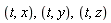 , parameters , parameters ![L[1, j]](/view.aspx?sf=218129_post/4929704b90d1dc1f48d46273a90dd81e.gif) . Define now . Define now ![`𝕃`[`~mu`, nu]](/view.aspx?sf=218129_post/41bf1319b816ac986188a2051df926bf.gif) using (18) for further computing with it in the next section using (18) for further computing with it in the next section

|
![{Lambda, `𝕃`[`~mu`, nu], Physics:-Dgamma[mu], Physics:-Psigma[mu], Physics:-d_[mu], Physics:-g_[mu, nu], Physics:-gamma_[a, b], Physics:-LeviCivita[alpha, beta, mu, nu]}](/view.aspx?sf=218129_post/1dbe3e1ec4d61e1af881f02ed40edb3b.gif)
|
(21) |
|
| |
Determination of ![Lambda[`~mu`, nu]](/view.aspx?sf=218129_post/77063a55e03f8824a8e514edc2810ff1.gif)
|
| |
From the components of ![`𝕃`[`~mu`, nu]](/view.aspx?sf=218129_post/1ac110fd5cecdbf0151e11e1f9c2d625.gif) in (18), the components of in (18), the components of ![Lambda[`~mu`, nu] = exp(`𝕃`[`~mu`, nu])](/view.aspx?sf=218129_post/1cc1bdcb50c7ac1f5b86b86d45a14520.gif) can be computed directly using the can be computed directly using the  command. Then, following Jackson's book, in what follows we also derive a general formula for command. Then, following Jackson's book, in what follows we also derive a general formula for ![`𝕃`[`~mu`, nu]](/view.aspx?sf=218129_post/64cf6f74d38f54a1bca962858b5cca9a.gif) in terms of in terms of  and and 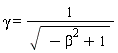 shown in [1] as equation (11.98), finally showing the form of shown in [1] as equation (11.98), finally showing the form of ![Lambda[`~mu`, nu]](/view.aspx?sf=218129_post/4c214e86cb0e7eb3a23816ed66772c05.gif) as a function of the relative velocity of the two inertial systems of references. as a function of the relative velocity of the two inertial systems of references.
An explicit form of ![Lambda[`~mu`, nu]](/view.aspx?sf=218129_post/ca084383354fd0cc468a3e04705cfba8.gif) in the case of a rotation on the in the case of a rotation on the plane can be computed by taking equal to zero all the parameters in (19) but for plane can be computed by taking equal to zero all the parameters in (19) but for ![L[1, 2]](/view.aspx?sf=218129_post/ab814e91decbeb27f0f981d5b63d30b6.gif) and substituting in and substituting in !["?≡`𝕃`[nu]^(mu)"](/view.aspx?sf=218129_post/6d7547a008fd1412af6b951b6b282c2a.gif)
, 0)](/view.aspx?sf=218129_post/d8556d98ddc9fc29b3cd0204402b74a6.gif)
|
![{L[1, 3] = 0, L[1, 4] = 0, L[2, 3] = 0, L[2, 4] = 0, L[3, 4] = 0}](/view.aspx?sf=218129_post/b2050e41058a745540a970670f447a42.gif)
|
(22) |
!["subs({L[1,3] = 0, L[1,4] = 0, L[2,3] = 0, L[2,4] = 0, L[3,4] = 0},?)"](/view.aspx?sf=218129_post/d00e59076149c461560f8ed0cf752f63.gif)
|
![`𝕃`[`~μ`, nu] = Matrix(%id = 36893488153606695500)](/view.aspx?sf=218129_post/2e9ed1b1bd1a3d957e5ecbf2912c9f51.gif)
|
(23) |
Computing the matrix exponential,
!["Lambda[~mu,nu]=LinearAlgebra:-MatrixExponential(rhs(?))"](/view.aspx?sf=218129_post/28a4715d3d05697d18635e0d2ea0fb25.gif)
|
![Lambda[`~μ`, nu] = Matrix(%id = 36893488151918824492)](/view.aspx?sf=218129_post/faebe7d74a6c0ec453161f98442261c0.gif)
|
(24) |

|
![Lambda[`~μ`, nu] = Matrix(%id = 36893488151918852684)](/view.aspx?sf=218129_post/f1fc92243d4e89fda175f4d9542069ee.gif)
|
(25) |
This is formula (4.2) in Landau & Lifshitz book [2]. An explicit form of ![Lambda[`~mu`, nu]](/view.aspx?sf=218129_post/c2834509aed007a8e171b23822ecbc1b.gif) in the case of a rotation on the in the case of a rotation on the plane can be computed by taking equal to zero all the parameters in (19) but for plane can be computed by taking equal to zero all the parameters in (19) but for ![L[2, 3]](/view.aspx?sf=218129_post/1c4338588156991703afa5b151b2e080.gif)
, 0)](/view.aspx?sf=218129_post/0b7a5e5d0f12a877b2f4a33b51da2789.gif)
|
![{L[1, 2] = 0, L[1, 3] = 0, L[1, 4] = 0, L[2, 4] = 0, L[3, 4] = 0}](/view.aspx?sf=218129_post/fe71c1472b91ccc642851aadd002ad5b.gif)
|
(26) |
!["subs({L[1,2] = 0, L[1,3] = 0, L[1,4] = 0, L[2,4] = 0, L[3,4] = 0},?)"](/view.aspx?sf=218129_post/d39b33c6a54ca26d1db55f4eabc55419.gif)
|
![`𝕃`[`~μ`, nu] = Matrix(%id = 36893488151918868828)](/view.aspx?sf=218129_post/9068bdff630a90139d0af07d4bad4756.gif)
|
(27) |
!["Lambda[~mu, nu]=LinearAlgebra:-MatrixExponential(rhs(?))"](/view.aspx?sf=218129_post/587b7e7a2fe5244a6052d19a47663baf.gif)
|
![Lambda[`~μ`, nu] = Matrix(%id = 36893488153289306948)](/view.aspx?sf=218129_post/93d5ebd34b2fdea08291462cbe80ed13.gif)
|
(28) |

| |
Rewriting ![`%𝕃`[`~mu`, nu] = K[`~i`]*Zeta[i]+S[`~i`]*omega[i]](/view.aspx?sf=218129_post/75f06e2325a287848a6e487f2a7e49f0.gif)
|
| |
Following Jackson's notation, for readability, redefine the 6 parameters entering ![`𝕃`[`~mu`, nu]](/view.aspx?sf=218129_post/1a5a2fa2bda9df6776872c3996301792.gif) as as
!['{LM[1, 2] = `ζ__1`, LM[1, 3] = `ζ__2`, LM[1, 4] = `ζ__3`, LM[2, 3] = `ω__3`, LM[2, 4] = -`ω__2`, LM[3, 4] = `ω__1`}'](/view.aspx?sf=218129_post/b8e7fc0ba3c7b0356a64625e74062868.gif)
|
![{`𝕃`[1, 2] = zeta__1, `𝕃`[1, 3] = zeta__2, `𝕃`[1, 4] = zeta__3, `𝕃`[2, 3] = omega__3, `𝕃`[2, 4] = -omega__2, `𝕃`[3, 4] = omega__1}](/view.aspx?sf=218129_post/4e8fa244356b181dfb02d48ae724a6ec.gif)
|
(29) |
(Note in the above the surrounding backquotes '...' to prevent a premature evaluation of the left-hand sides; that is necessary when using the  command.) With this redefinition, command.) With this redefinition, ![`𝕃`[`~mu`, nu]](/view.aspx?sf=218129_post/1fd51022d4f55ac196c41c139c1be7ee.gif) becomes becomes
![Library:-RedefineTensorComponent({`𝕃`[1, 2] = zeta__1, `𝕃`[1, 3] = zeta__2, `𝕃`[1, 4] = zeta__3, `𝕃`[2, 3] = omega__3, `𝕃`[2, 4] = -omega__2, `𝕃`[3, 4] = omega__1})](/view.aspx?sf=218129_post/e3f26d629d5e8bae6f6c2f4fdf96b673.gif)
![LM[`~μ`, nu, matrix]](/view.aspx?sf=218129_post/02f7df091df0f60d1cf1f76bbedcc890.gif)
|
![`𝕃`[`~μ`, nu] = Matrix(%id = 36893488151939901668)](/view.aspx?sf=218129_post/4dcc6e1b39ea41af6d7d41d123ce7414.gif)
|
(30) |
where each parameter is related to a rotation angle on one plane. Any Lorentz transformation (rotation in 4D pseudo-Euclidean space) can be represented as the composition of these six rotations, and to each rotation, corresponds the matrix that results from taking equal to zero all of the six parameters but one.
The set of six parameters can be split into two sets of three parameters each, one representing rotations on the  planes, parameters planes, parameters  , and the other representing rotations on the , and the other representing rotations on the  planes, parameters planes, parameters  . With that, following [1], (30) can be rewritten in terms of four 3D tensors, two of them with the parameters as components, the other two with matrix as components, as follows: . With that, following [1], (30) can be rewritten in terms of four 3D tensors, two of them with the parameters as components, the other two with matrix as components, as follows:
![Zeta[i] = [`ζ__1`, `ζ__2`, `ζ__3`], omega[i] = [`ω__1`, `ω__2`, `ω__3`], K[i] = [K__1, K__2, K__3], S[i] = [S__1, S__2, S__3]](/view.aspx?sf=218129_post/a00540c260c1cc590fd7a58872ef92c8.gif)
|
![Zeta[i] = [zeta__1, zeta__2, zeta__3], omega[i] = [omega__1, omega__2, omega__3], K[i] = [K__1, K__2, K__3], S[i] = [S__1, S__2, S__3]](/view.aspx?sf=218129_post/645de4ad4b4d2a9fb207ffb82898a082.gif)
|
(31) |
![Define(Zeta[i] = [zeta__1, zeta__2, zeta__3], omega[i] = [omega__1, omega__2, omega__3], K[i] = [K__1, K__2, K__3], S[i] = [S__1, S__2, S__3])](/view.aspx?sf=218129_post/857c5d34b99598433370cd1ab67b0cc4.gif)
|
![{Lambda, `𝕃`[mu, nu], Physics:-Dgamma[mu], K[i], Physics:-Psigma[mu], S[i], Zeta[i], Physics:-d_[mu], Physics:-g_[mu, nu], Physics:-gamma_[a, b], omega[i], Physics:-LeviCivita[alpha, beta, mu, nu]}](/view.aspx?sf=218129_post/78db8a158e418811bc6ba692729be66c.gif)
|
(32) |
The 3D tensors ![K[i]](/view.aspx?sf=218129_post/cb63e918dd2318003f3cad0e51182979.gif) and and ![S[i]](/view.aspx?sf=218129_post/1facafbe6a030ae21033d2119a8997b2.gif) satisfy the commutation relations satisfy the commutation relations

|
![[noncommutativeprefix = {K, S}]](/view.aspx?sf=218129_post/6f42d4be2666ec143350bd093eb9d9c1.gif)
|
(33) |
![Commutator(S[i], S[j]) = LeviCivita[i, j, k]*S[k]](/view.aspx?sf=218129_post/35bf7cb0c3d8ed55d8b284537233d6fd.gif)
|
![Physics:-Commutator(S[i], S[j]) = Physics:-LeviCivita[i, j, k]*S[`~k`]](/view.aspx?sf=218129_post/1d86b41436ede75f2cb201e0dd4970e5.gif)
|
(34) |
![Commutator(S[i], K[j]) = LeviCivita[i, j, k]*K[k]](/view.aspx?sf=218129_post/3b3895bb6dc5a3b62d335c7cd122372c.gif)
|
![Physics:-Commutator(S[i], K[j]) = Physics:-LeviCivita[i, j, k]*K[`~k`]](/view.aspx?sf=218129_post/894f3a96db0e8ee08531126056f86ee3.gif)
|
(35) |
![Commutator(K[i], K[j]) = -LeviCivita[i, j, k]*S[k]](/view.aspx?sf=218129_post/223301b045ed1a6d238540b52cabad25.gif)
|
![Physics:-Commutator(K[i], K[j]) = -Physics:-LeviCivita[i, j, k]*S[`~k`]](/view.aspx?sf=218129_post/acb196ab173abe1eb3956dbe75fbcfb8.gif)
|
(36) |
The matrix components of the 3D tensor  , related to rotations on the , related to rotations on the  planes, are planes, are
![K__1 := matrix([[0, 1, 0, 0], [1, 0, 0, 0], [0, 0, 0, 0], [0, 0, 0, 0]])](/view.aspx?sf=218129_post/3d56851af42af568d01d4ee7972bea89.gif)
|
![array( 1 .. 4, 1 .. 4, [( 3, 1 ) = (0), ( 4, 2 ) = (0), ( 1, 2 ) = (1), ( 3, 2 ) = (0), ( 1, 3 ) = (0), ( 4, 3 ) = (0), ( 4, 4 ) = (0), ( 1, 1 ) = (0), ( 2, 1 ) = (1), ( 3, 3 ) = (0), ( 2, 4 ) = (0), ( 1, 4 ) = (0), ( 2, 2 ) = (0), ( 2, 3 ) = (0), ( 4, 1 ) = (0), ( 3, 4 ) = (0) ] )](/view.aspx?sf=218129_post/b48cbd92f2858f6f54204746ecb84fbb.gif)
|
(37) |
![K__2 := matrix([[0, 0, 1, 0], [0, 0, 0, 0], [1, 0, 0, 0], [0, 0, 0, 0]])](/view.aspx?sf=218129_post/d814c82d540df532c0fc8e0a52a3f891.gif)
|
![array( 1 .. 4, 1 .. 4, [( 3, 1 ) = (1), ( 4, 2 ) = (0), ( 1, 2 ) = (0), ( 3, 2 ) = (0), ( 1, 3 ) = (1), ( 4, 3 ) = (0), ( 4, 4 ) = (0), ( 1, 1 ) = (0), ( 2, 1 ) = (0), ( 3, 3 ) = (0), ( 2, 4 ) = (0), ( 1, 4 ) = (0), ( 2, 2 ) = (0), ( 2, 3 ) = (0), ( 4, 1 ) = (0), ( 3, 4 ) = (0) ] )](/view.aspx?sf=218129_post/d0f1e0d9ea61a789159e4e3e651dd770.gif)
|
(38) |
![K__3 := matrix([[0, 0, 0, 1], [0, 0, 0, 0], [0, 0, 0, 0], [1, 0, 0, 0]])](/view.aspx?sf=218129_post/78dc345ff909073ac3ba2a2c525d8a02.gif)
|
![array( 1 .. 4, 1 .. 4, [( 3, 1 ) = (0), ( 4, 2 ) = (0), ( 1, 2 ) = (0), ( 3, 2 ) = (0), ( 1, 3 ) = (0), ( 4, 3 ) = (0), ( 4, 4 ) = (0), ( 1, 1 ) = (0), ( 2, 1 ) = (0), ( 3, 3 ) = (0), ( 2, 4 ) = (0), ( 1, 4 ) = (1), ( 2, 2 ) = (0), ( 2, 3 ) = (0), ( 4, 1 ) = (1), ( 3, 4 ) = (0) ] )](/view.aspx?sf=218129_post/1d8e28c0124fb51856910797ea872e7f.gif)
|
(39) |
The matrix components of the 3D tensor  , related to rotations on the , related to rotations on the  3D space planes, are 3D space planes, are
![S__1 := matrix([[0, 0, 0, 0], [0, 0, 0, 0], [0, 0, 0, -1], [0, 0, 1, 0]])](/view.aspx?sf=218129_post/19cd4a398feeaf1e70ef9c8c92b0e01f.gif)
|
![array( 1 .. 4, 1 .. 4, [( 3, 1 ) = (0), ( 4, 2 ) = (0), ( 1, 2 ) = (0), ( 3, 2 ) = (0), ( 1, 3 ) = (0), ( 4, 3 ) = (1), ( 4, 4 ) = (0), ( 1, 1 ) = (0), ( 2, 1 ) = (0), ( 3, 3 ) = (0), ( 2, 4 ) = (0), ( 1, 4 ) = (0), ( 2, 2 ) = (0), ( 2, 3 ) = (0), ( 4, 1 ) = (0), ( 3, 4 ) = (-1) ] )](/view.aspx?sf=218129_post/ed0bf4c9a493deb7994c1ca48c11cdd9.gif)
|
(40) |
![S__2 := matrix([[0, 0, 0, 0], [0, 0, 0, 1], [0, 0, 0, 0], [0, -1, 0, 0]])](/view.aspx?sf=218129_post/1ea829cbbe74ce5203b0417119c07f5f.gif)
|
![array( 1 .. 4, 1 .. 4, [( 3, 1 ) = (0), ( 4, 2 ) = (-1), ( 1, 2 ) = (0), ( 3, 2 ) = (0), ( 1, 3 ) = (0), ( 4, 3 ) = (0), ( 4, 4 ) = (0), ( 1, 1 ) = (0), ( 2, 1 ) = (0), ( 3, 3 ) = (0), ( 2, 4 ) = (1), ( 1, 4 ) = (0), ( 2, 2 ) = (0), ( 2, 3 ) = (0), ( 4, 1 ) = (0), ( 3, 4 ) = (0) ] )](/view.aspx?sf=218129_post/5da1fe96955e2d96fd9db91b6804050a.gif)
|
(41) |
![S__3 := matrix([[0, 0, 0, 0], [0, 0, -1, 0], [0, 1, 0, 0], [0, 0, 0, 0]])](/view.aspx?sf=218129_post/67c940c056cb3d33101476a2e70f1088.gif)
|
![array( 1 .. 4, 1 .. 4, [( 3, 1 ) = (0), ( 4, 2 ) = (0), ( 1, 2 ) = (0), ( 3, 2 ) = (1), ( 1, 3 ) = (0), ( 4, 3 ) = (0), ( 4, 4 ) = (0), ( 1, 1 ) = (0), ( 2, 1 ) = (0), ( 3, 3 ) = (0), ( 2, 4 ) = (0), ( 1, 4 ) = (0), ( 2, 2 ) = (0), ( 2, 3 ) = (-1), ( 4, 1 ) = (0), ( 3, 4 ) = (0) ] )](/view.aspx?sf=218129_post/5ac94ddb96c3bb66e66860b326cf62b3.gif)
|
(42) |

The ![`𝕃`[`~mu`, nu]](/view.aspx?sf=218129_post/8b284363fce4792b64b9bb659a0fc3c0.gif) tensor is now expressed in terms of these objects as tensor is now expressed in terms of these objects as
![%LM[`~μ`, nu] = omega[i].S[i]+Zeta[i].K[i]](/view.aspx?sf=218129_post/fb3450f56be9899fc36c1a44d1ec8f1c.gif)
|
![`%𝕃`[`~μ`, nu] = K[`~i`]*Zeta[i]+S[`~i`]*omega[i]](/view.aspx?sf=218129_post/da9d14854d21ae1d46dc7015d57247a6.gif)
|
(50) |
where the right-hand side, without free indices, represents the matrix form of ![`%𝕃`[`~mu`, nu]](/view.aspx?sf=218129_post/c76b5d1994f95ff0bead0154bc8bdf65.gif) . This notation makes explicit the fact that any Lorentz transformation can always be written as the composition of six rotations . This notation makes explicit the fact that any Lorentz transformation can always be written as the composition of six rotations
![SumOverRepeatedIndices(`%𝕃`[`~μ`, nu] = K[`~i`]*Zeta[i]+S[`~i`]*omega[i])](/view.aspx?sf=218129_post/e30e7a2e0a767c069791588e2f24e741.gif)
|
![`%𝕃`[`~μ`, nu] = zeta__1*K[`~1`]+zeta__2*K[`~2`]+zeta__3*K[`~3`]+omega__1*S[`~1`]+omega__2*S[`~2`]+omega__3*S[`~3`]](/view.aspx?sf=218129_post/ff4cf49377f937e3dd6b570917b053bc.gif)
|
(51) |
![Library:-RewriteInMatrixForm(`%𝕃`[`~μ`, nu] = zeta__1*K[`~1`]+zeta__2*K[`~2`]+zeta__3*K[`~3`]+omega__1*S[`~1`]+omega__2*S[`~2`]+omega__3*S[`~3`])](/view.aspx?sf=218129_post/bf841b209cbddf7a1572fa376f88831f.gif)
|
![`%𝕃`[`~μ`, nu] = (array( 1 .. 4, 1 .. 4, [( 3, 1 ) = (0), ( 4, 2 ) = (0), ( 1, 2 ) = (zeta__1), ( 3, 2 ) = (0), ( 1, 3 ) = (0), ( 4, 3 ) = (0), ( 4, 4 ) = (0), ( 1, 1 ) = (0), ( 2, 1 ) = (zeta__1), ( 3, 3 ) = (0), ( 2, 4 ) = (0), ( 1, 4 ) = (0), ( 2, 2 ) = (0), ( 2, 3 ) = (0), ( 4, 1 ) = (0), ( 3, 4 ) = (0) ] ))+(array( 1 .. 4, 1 .. 4, [( 3, 1 ) = (zeta__2), ( 4, 2 ) = (0), ( 1, 2 ) = (0), ( 3, 2 ) = (0), ( 1, 3 ) = (zeta__2), ( 4, 3 ) = (0), ( 4, 4 ) = (0), ( 1, 1 ) = (0), ( 2, 1 ) = (0), ( 3, 3 ) = (0), ( 2, 4 ) = (0), ( 1, 4 ) = (0), ( 2, 2 ) = (0), ( 2, 3 ) = (0), ( 4, 1 ) = (0), ( 3, 4 ) = (0) ] ))+(array( 1 .. 4, 1 .. 4, [( 3, 1 ) = (0), ( 4, 2 ) = (0), ( 1, 2 ) = (0), ( 3, 2 ) = (0), ( 1, 3 ) = (0), ( 4, 3 ) = (0), ( 4, 4 ) = (0), ( 1, 1 ) = (0), ( 2, 1 ) = (0), ( 3, 3 ) = (0), ( 2, 4 ) = (0), ( 1, 4 ) = (zeta__3), ( 2, 2 ) = (0), ( 2, 3 ) = (0), ( 4, 1 ) = (zeta__3), ( 3, 4 ) = (0) ] ))+(array( 1 .. 4, 1 .. 4, [( 3, 1 ) = (0), ( 4, 2 ) = (0), ( 1, 2 ) = (0), ( 3, 2 ) = (0), ( 1, 3 ) = (0), ( 4, 3 ) = (omega__1), ( 4, 4 ) = (0), ( 1, 1 ) = (0), ( 2, 1 ) = (0), ( 3, 3 ) = (0), ( 2, 4 ) = (0), ( 1, 4 ) = (0), ( 2, 2 ) = (0), ( 2, 3 ) = (0), ( 4, 1 ) = (0), ( 3, 4 ) = (-omega__1) ] ))+(array( 1 .. 4, 1 .. 4, [( 3, 1 ) = (0), ( 4, 2 ) = (-omega__2), ( 1, 2 ) = (0), ( 3, 2 ) = (0), ( 1, 3 ) = (0), ( 4, 3 ) = (0), ( 4, 4 ) = (0), ( 1, 1 ) = (0), ( 2, 1 ) = (0), ( 3, 3 ) = (0), ( 2, 4 ) = (omega__2), ( 1, 4 ) = (0), ( 2, 2 ) = (0), ( 2, 3 ) = (0), ( 4, 1 ) = (0), ( 3, 4 ) = (0) ] ))+(array( 1 .. 4, 1 .. 4, [( 3, 1 ) = (0), ( 4, 2 ) = (0), ( 1, 2 ) = (0), ( 3, 2 ) = (omega__3), ( 1, 3 ) = (0), ( 4, 3 ) = (0), ( 4, 4 ) = (0), ( 1, 1 ) = (0), ( 2, 1 ) = (0), ( 3, 3 ) = (0), ( 2, 4 ) = (0), ( 1, 4 ) = (0), ( 2, 2 ) = (0), ( 2, 3 ) = (-omega__3), ( 4, 1 ) = (0), ( 3, 4 ) = (0) ] ))](/view.aspx?sf=218129_post/be4873e9db02a4ec57e5d13575bf1331.gif)
|
(52) |
![Library:-PerformMatrixOperations(`%𝕃`[`~μ`, nu] = zeta__1*K[`~1`]+zeta__2*K[`~2`]+zeta__3*K[`~3`]+omega__1*S[`~1`]+omega__2*S[`~2`]+omega__3*S[`~3`])](/view.aspx?sf=218129_post/4a3482f38f76c97f7220036d0a79a5b4.gif)
|
![`%𝕃`[`~μ`, nu] = (array( 1 .. 4, 1 .. 4, [( 3, 1 ) = (zeta__2), ( 4, 2 ) = (-omega__2), ( 1, 2 ) = (zeta__1), ( 3, 2 ) = (omega__3), ( 1, 3 ) = (zeta__2), ( 4, 3 ) = (omega__1), ( 4, 4 ) = (0), ( 1, 1 ) = (0), ( 2, 1 ) = (zeta__1), ( 3, 3 ) = (0), ( 2, 4 ) = (omega__2), ( 1, 4 ) = (zeta__3), ( 2, 2 ) = (0), ( 2, 3 ) = (-omega__3), ( 4, 1 ) = (zeta__3), ( 3, 4 ) = (-omega__1) ] ))](/view.aspx?sf=218129_post/a9a7fd55973a86af7a55637d96f82b38.gif)
|
(53) |

which is the same as the starting point (30)
|
| |
The transformation ![Lambda[`~mu`, nu] = exp(`%𝕃`[`~mu`, nu])](/view.aspx?sf=218129_post/d8f581acef2320fc85a9f2ea21c19c0d.gif) , where , where ![`%𝕃`[`~mu`, nu] = K[`~i`]*Zeta[i]](/view.aspx?sf=218129_post/d7a9583bfda0bf471d58646ebae27bd9.gif) , as a function of the relative velocity of two inertial systems , as a function of the relative velocity of two inertial systems
|
| |
As seen in the previous subsection, in ![`𝕃`[`~mu`, nu] = K[`~i`]*Zeta[i]+S[`~i`]*omega[i]](/view.aspx?sf=218129_post/1d762006759bb92368b50dd1401b3fb6.gif) , the second term, , the second term, ![S[`~i`]*omega[i]](/view.aspx?sf=218129_post/5ac3e8c7d46fdc6ab128dcc5d45a1a5f.gif) , corresponds to 3D rotations embedded in the general form of 4D Lorentz transformations, and , corresponds to 3D rotations embedded in the general form of 4D Lorentz transformations, and ![K[`~i`]*Zeta[i]](/view.aspx?sf=218129_post/7bf9404a377d0fdc385cb6497f249ebd.gif) is the term that relates the coordinates of two inertial systems of reference that move with respect to each other at constant velocity is the term that relates the coordinates of two inertial systems of reference that move with respect to each other at constant velocity  . In this section, . In this section, ![K[`~i`]*Zeta[i]](/view.aspx?sf=218129_post/09b0051ca2f5d1da539b929f80d2ab8c.gif) is rewritten in terms of that velocity, arriving at equation (11.98) of Jackson's book [1]. The key observation is that the 3D vector is rewritten in terms of that velocity, arriving at equation (11.98) of Jackson's book [1]. The key observation is that the 3D vector ![Zeta[i]](/view.aspx?sf=218129_post/868cc80411d191ec72b1f26629c77d0f.gif) , can be rewritten in terms of , can be rewritten in terms of  , where , where  and c is the velocity of light (for the rationale of that relation, see [2], sec 4, discussion before formula (4.3)). and c is the velocity of light (for the rationale of that relation, see [2], sec 4, discussion before formula (4.3)).
Use a macro - say ub - to represent the atomic variable  (this variable can be entered as `#mover(mi("β"),mo("ˆ")`. In general, to create atomic variables, see the section on Atomic Variables of the page 2DMathDetails ). (this variable can be entered as `#mover(mi("β"),mo("ˆ")`. In general, to create atomic variables, see the section on Atomic Variables of the page 2DMathDetails ).

![ub[j] = [ub[1], ub[2], ub[3]], Zeta[j] = ub[j]*arctanh(beta)](/view.aspx?sf=218129_post/a27bf333abd9b3395c3d0799d66bafdf.gif)
|
![`#mover(mi("β",fontstyle = "normal"),mo("ˆ"))`[j] = [`#mover(mi("β",fontstyle = "normal"),mo("ˆ"))`[1], `#mover(mi("β",fontstyle = "normal"),mo("ˆ"))`[2], `#mover(mi("β",fontstyle = "normal"),mo("ˆ"))`[3]], Zeta[j] = `#mover(mi("β",fontstyle = "normal"),mo("ˆ"))`[j]*arctanh(beta)](/view.aspx?sf=218129_post/45301a3dcf4ffe73fad9035f48df7d03.gif)
|
(54) |
![Define(`#mover(mi("β",fontstyle = "normal"),mo("ˆ"))`[j] = [`#mover(mi("β",fontstyle = "normal"),mo("ˆ"))`[1], `#mover(mi("β",fontstyle = "normal"),mo("ˆ"))`[2], `#mover(mi("β",fontstyle = "normal"),mo("ˆ"))`[3]], Zeta[j] = `#mover(mi("β",fontstyle = "normal"),mo("ˆ"))`[j]*arctanh(beta))](/view.aspx?sf=218129_post/0e4716374e4daa42594aa50ee340f4e5.gif)
|
![{Lambda, `𝕃`[mu, nu], Physics:-Dgamma[mu], K[i], Physics:-Psigma[mu], S[i], Zeta[i], Physics:-d_[mu], Physics:-g_[mu, nu], Physics:-gamma_[a, b], omega[i], Physics:-LeviCivita[alpha, beta, mu, nu], `#mover(mi("β",fontstyle = "normal"),mo("ˆ"))`[j]}](/view.aspx?sf=218129_post/9f1629bc5de3b1ceacd4eae2256a9634.gif)
|
(55) |
With these two definitions, and excluding the rotation term ![S[`~i`]*omega[i]](/view.aspx?sf=218129_post/3856c4ef29c7ca1f9103bba662259275.gif) we have we have
![%LM[`~μ`, nu] = Zeta[j]*K[j]](/view.aspx?sf=218129_post/83cf484e07c412636bc4ebd61fddeafb.gif)
|
![`%𝕃`[`~μ`, nu] = Zeta[j]*K[`~j`]](/view.aspx?sf=218129_post/fbc91c4c7ca09f52864776081ccac34c.gif)
|
(56) |
![SumOverRepeatedIndices(`%𝕃`[`~μ`, nu] = Zeta[j]*K[`~j`])](/view.aspx?sf=218129_post/01c31799f9291d14af1e12897e1314e4.gif)
|
![`%𝕃`[`~μ`, nu] = arctanh(beta)*(K[`~1`]*`#mover(mi("β",fontstyle = "normal"),mo("ˆ"))`[1]+K[`~2`]*`#mover(mi("β",fontstyle = "normal"),mo("ˆ"))`[2]+K[`~3`]*`#mover(mi("β",fontstyle = "normal"),mo("ˆ"))`[3])](/view.aspx?sf=218129_post/e3efed6e5e02138dcafc14007a14bf21.gif)
|
(57) |
![Library:-PerformMatrixOperations(`%𝕃`[`~μ`, nu] = arctanh(beta)*(K[`~1`]*`#mover(mi("β",fontstyle = "normal"),mo("ˆ"))`[1]+K[`~2`]*`#mover(mi("β",fontstyle = "normal"),mo("ˆ"))`[2]+K[`~3`]*`#mover(mi("β",fontstyle = "normal"),mo("ˆ"))`[3]))](/view.aspx?sf=218129_post/57c0513f456389c433c40fad831d3c64.gif)
|
![`%𝕃`[`~μ`, nu] = (array( 1 .. 4, 1 .. 4, [( 3, 1 ) = (`#mover(mi("β",fontstyle = "normal"),mo("ˆ"))`[2]*arctanh(beta)), ( 4, 2 ) = (0), ( 1, 2 ) = (`#mover(mi("β",fontstyle = "normal"),mo("ˆ"))`[1]*arctanh(beta)), ( 3, 2 ) = (0), ( 1, 3 ) = (`#mover(mi("β",fontstyle = "normal"),mo("ˆ"))`[2]*arctanh(beta)), ( 4, 3 ) = (0), ( 4, 4 ) = (0), ( 1, 1 ) = (0), ( 2, 1 ) = (`#mover(mi("β",fontstyle = "normal"),mo("ˆ"))`[1]*arctanh(beta)), ( 3, 3 ) = (0), ( 2, 4 ) = (0), ( 1, 4 ) = (`#mover(mi("β",fontstyle = "normal"),mo("ˆ"))`[3]*arctanh(beta)), ( 2, 2 ) = (0), ( 2, 3 ) = (0), ( 4, 1 ) = (`#mover(mi("β",fontstyle = "normal"),mo("ˆ"))`[3]*arctanh(beta)), ( 3, 4 ) = (0) ] ))](/view.aspx?sf=218129_post/4906ec806f4eb282f04e616a46a459bc.gif)
|
(58) |
From this expression, the form of !["Lambda[nu]^(mu)"](/view.aspx?sf=218129_post/193360453af61d4e63c31980642d4710.gif) can be obtained as in (24) using can be obtained as in (24) using  and simplifying the result taking into account that and simplifying the result taking into account that ![`#mover(mi("β",fontstyle = "normal"),mo("ˆ"))`[j]](/view.aspx?sf=218129_post/e9a27015f2316b4975e14f8512043e3f.gif) is a unit vector is a unit vector
![SumOverRepeatedIndices(ub[j]^2) = 1](/view.aspx?sf=218129_post/7ffc729429852be2bcef3d07257533ac.gif)
|
![`#mover(mi("β",fontstyle = "normal"),mo("ˆ"))`[1]^2+`#mover(mi("β",fontstyle = "normal"),mo("ˆ"))`[2]^2+`#mover(mi("β",fontstyle = "normal"),mo("ˆ"))`[3]^2 = 1](/view.aspx?sf=218129_post/9ca961d4bef490d7fb02e08f09da47f9.gif)
|
(59) |
![exp(lhs(`%𝕃`[`~μ`, nu] = (array( 1 .. 4, 1 .. 4, [( 3, 3 ) = (0), ( 2, 3 ) = (0), ( 4, 2 ) = (0), ( 1, 1 ) = (0), ( 1, 2 ) = (`#mover(mi("β",fontstyle = "normal"),mo("ˆ"))`[1]*arctanh(beta)), ( 4, 4 ) = (0), ( 4, 1 ) = (`#mover(mi("β",fontstyle = "normal"),mo("ˆ"))`[3]*arctanh(beta)), ( 3, 1 ) = (`#mover(mi("β",fontstyle = "normal"),mo("ˆ"))`[2]*arctanh(beta)), ( 3, 4 ) = (0), ( 4, 3 ) = (0), ( 1, 4 ) = (`#mover(mi("β",fontstyle = "normal"),mo("ˆ"))`[3]*arctanh(beta)), ( 3, 2 ) = (0), ( 1, 3 ) = (`#mover(mi("β",fontstyle = "normal"),mo("ˆ"))`[2]*arctanh(beta)), ( 2, 4 ) = (0), ( 2, 1 ) = (`#mover(mi("β",fontstyle = "normal"),mo("ˆ"))`[1]*arctanh(beta)), ( 2, 2 ) = (0) ] )))) = simplify(LinearAlgebra:-MatrixExponential(rhs(`%𝕃`[`~μ`, nu] = (array( 1 .. 4, 1 .. 4, [( 3, 3 ) = (0), ( 2, 3 ) = (0), ( 4, 2 ) = (0), ( 1, 1 ) = (0), ( 1, 2 ) = (`#mover(mi("β",fontstyle = "normal"),mo("ˆ"))`[1]*arctanh(beta)), ( 4, 4 ) = (0), ( 4, 1 ) = (`#mover(mi("β",fontstyle = "normal"),mo("ˆ"))`[3]*arctanh(beta)), ( 3, 1 ) = (`#mover(mi("β",fontstyle = "normal"),mo("ˆ"))`[2]*arctanh(beta)), ( 3, 4 ) = (0), ( 4, 3 ) = (0), ( 1, 4 ) = (`#mover(mi("β",fontstyle = "normal"),mo("ˆ"))`[3]*arctanh(beta)), ( 3, 2 ) = (0), ( 1, 3 ) = (`#mover(mi("β",fontstyle = "normal"),mo("ˆ"))`[2]*arctanh(beta)), ( 2, 4 ) = (0), ( 2, 1 ) = (`#mover(mi("β",fontstyle = "normal"),mo("ˆ"))`[1]*arctanh(beta)), ( 2, 2 ) = (0) ] )))), {`#mover(mi("β",fontstyle = "normal"),mo("ˆ"))`[1]^2+`#mover(mi("β",fontstyle = "normal"),mo("ˆ"))`[2]^2+`#mover(mi("β",fontstyle = "normal"),mo("ˆ"))`[3]^2 = 1})](/view.aspx?sf=218129_post/e0728e036a2f2b73a7063086970b4ae3.gif)
|
![exp(`%𝕃`[`~μ`, nu]) = Matrix(%id = 36893488153234621252)](/view.aspx?sf=218129_post/46b6e293ffbd828e4b590c3f7a8df976.gif)
|
(60) |
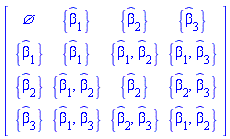
It is useful at this point to analyze the dependency on the components of ![`#mover(mi("β",fontstyle = "normal"),mo("ˆ"))`[j]](/view.aspx?sf=218129_post/b37dcc58fe1e9dbe199be961e5a6b704.gif) of this matrix of this matrix

|
|
(61) |
We see that the diagonal element ![[4, 4]](/view.aspx?sf=218129_post/428932974d39b7103ed1c5a62ea23a93.gif) depends on two instead of only one component of depends on two instead of only one component of ![`#mover(mi("β",fontstyle = "normal"),mo("ˆ"))`[j]](/view.aspx?sf=218129_post/b9a1bd86413309e9523269790c45bfda.gif) . That is due to the simplification with respect to side relations , performed in (60), that constructs an elimination Groebner Basis that cannot reduce at once, using the single equation (59), the dependency of all of the elements . That is due to the simplification with respect to side relations , performed in (60), that constructs an elimination Groebner Basis that cannot reduce at once, using the single equation (59), the dependency of all of the elements ![[2, 2], [3, 3]](/view.aspx?sf=218129_post/0faf5f4ed95bb89a91319ab5ab8e0728.gif) and and ![[4, 4]](/view.aspx?sf=218129_post/7a9e54c8208848c296e41c5d0c7a08df.gif) to a single component of to a single component of ![`#mover(mi("β",fontstyle = "normal"),mo("ˆ"))`[j]](/view.aspx?sf=218129_post/a549b607c1a8c9f677b259fd6926695d.gif) . So, to reduce further the dependency of the . So, to reduce further the dependency of the ![[4, 4]](/view.aspx?sf=218129_post/7502a5b5aac72e38f8e2bb7191099ff9.gif) element, this component of (60) requires one more simplification step, using a different elimination strategy, explicitly requesting the elimination of element, this component of (60) requires one more simplification step, using a different elimination strategy, explicitly requesting the elimination of !["{(beta)[1],(beta)[2]}"](/view.aspx?sf=218129_post/64e696afa16c49643f57a944ddfadac2.gif)
!["rhs(?)[4,4]"](/view.aspx?sf=218129_post/dcffd5425a43a6ada5ba9dcbb1cc4228.gif)
|
![((`#mover(mi("β",fontstyle = "normal"),mo("ˆ"))`[1]^2+`#mover(mi("β",fontstyle = "normal"),mo("ˆ"))`[2]^2)*(-beta^2+1)^(1/2)-`#mover(mi("β",fontstyle = "normal"),mo("ˆ"))`[1]^2-`#mover(mi("β",fontstyle = "normal"),mo("ˆ"))`[2]^2+1)/(-beta^2+1)^(1/2)](/view.aspx?sf=218129_post/a38efb9ade33ced4817db6b44f5b261c.gif)
|
(62) |
![simplify(((`#mover(mi("β",fontstyle = "normal"),mo("ˆ"))`[1]^2+`#mover(mi("β",fontstyle = "normal"),mo("ˆ"))`[2]^2)*(-beta^2+1)^(1/2)-`#mover(mi("β",fontstyle = "normal"),mo("ˆ"))`[1]^2-`#mover(mi("β",fontstyle = "normal"),mo("ˆ"))`[2]^2+1)/(-beta^2+1)^(1/2), {`#mover(mi("β",fontstyle = "normal"),mo("ˆ"))`[1]^2+`#mover(mi("β",fontstyle = "normal"),mo("ˆ"))`[2]^2+`#mover(mi("β",fontstyle = "normal"),mo("ˆ"))`[3]^2 = 1}, {`#mover(mi("β",fontstyle = "normal"),mo("ˆ"))`[1], `#mover(mi("β",fontstyle = "normal"),mo("ˆ"))`[2]})](/view.aspx?sf=218129_post/59d5adfccfb6a49298278899175ab8a8.gif)
|
![(-(-beta^2+1)^(1/2)*`#mover(mi("β",fontstyle = "normal"),mo("ˆ"))`[3]^2+`#mover(mi("β",fontstyle = "normal"),mo("ˆ"))`[3]^2+(-beta^2+1)^(1/2))/(-beta^2+1)^(1/2)](/view.aspx?sf=218129_post/36e6f106459a703e286c3413e32213ad.gif)
|
(63) |
This result involves only ![`#mover(mi("β",fontstyle = "normal"),mo("ˆ"))`[3]](/view.aspx?sf=218129_post/6e6d0049f020ec204363701e30572914.gif) , and with it the form of , and with it the form of ![Lambda[`~mu`, nu] = exp(`%𝕃`[`~mu`, nu])](/view.aspx?sf=218129_post/eadf7b92fbfe1d7fe8079094f2c44452.gif) becomes becomes
!["subs(1/(-beta^2+1)^(1/2)*((`#mover(mi("β",fontstyle = "normal"),mo("ˆ"))`[1]^2+`#mover(mi("β",fontstyle = "normal"),mo("ˆ"))`[2]^2)*(-beta^2+1)^(1/2)-`#mover(mi("β",fontstyle = "normal"),mo("ˆ"))`[1]^2-`#mover(mi("β",fontstyle = "normal"),mo("ˆ"))`[2]^2+1) = (-(-beta^2+1)^(1/2)*`#mover(mi("β",fontstyle = "normal"),mo("ˆ"))`[3]^2+`#mover(mi("β",fontstyle = "normal"),mo("ˆ"))`[3]^2+(-beta^2+1)^(1/2))/(-beta^2+1)^(1/2),?)"](/view.aspx?sf=218129_post/3857b2047f1552f5c57893e65f38b27c.gif)
|
![exp(`%𝕃`[`~μ`, nu]) = Matrix(%id = 36893488151918876660)](/view.aspx?sf=218129_post/838b61e4084e21a1d4ceb9dcf0b5914b.gif)
|
(64) |
Replacing now the components of the unit vector ![`#mover(mi("β",fontstyle = "normal"),mo("ˆ"))`[j]](/view.aspx?sf=218129_post/709c398e304d579cd000ed8249e07f3b.gif) by the components of the vector by the components of the vector  divided by its modulus divided by its modulus 
![seq(ub[j] = beta[j]/beta, j = 1 .. 3)](/view.aspx?sf=218129_post/69acfb648742ccbf03037746fcd1bd21.gif)
|
![`#mover(mi("β",fontstyle = "normal"),mo("ˆ"))`[1] = beta[1]/beta, `#mover(mi("β",fontstyle = "normal"),mo("ˆ"))`[2] = beta[2]/beta, `#mover(mi("β",fontstyle = "normal"),mo("ˆ"))`[3] = beta[3]/beta](/view.aspx?sf=218129_post/9a893afb2af143834b848cf198ec5dae.gif)
|
(65) |
and recalling that
![exp(`%𝕃`[`~μ`, nu]) = Lambda[`~μ`, nu]](/view.aspx?sf=218129_post/184d0d54e1ea3717f377d046b2dd26df.gif)
|
![exp(`%𝕃`[`~μ`, nu]) = Lambda[`~μ`, nu]](/view.aspx?sf=218129_post/24e2fcfeb3222c70d96bdd0837952dc1.gif)
|
(66) |
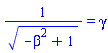
to get equation (11.98) in Jackson's book it suffices to introduce (the customary notation)

|
|
(67) |
!["simplify(subs(`#mover(mi("β",fontstyle = "normal"),mo("ˆ"))`[1] = beta[1]/beta, exp(`%𝕃`[`~μ`,nu]) = Lambda[`~μ`,nu], 1/(-beta^2+1)^(1/2) = gamma,(1/(-beta^2+1)^(1/2) = gamma)^(-1),?))"](/view.aspx?sf=218129_post/b710d83806ae44f540099c7d5aa779f6.gif)
|
![Lambda[`~μ`, nu] = Matrix(%id = 36893488151911556148)](/view.aspx?sf=218129_post/4055740fcbc3b5594272a0f5a71a060b.gif)
|
(68) |
This is equation (11.98) in Jackson's book.
Finally, to get the form of this general Lorentz transformation excluding 3D rotations, directly expressed in terms of the relative velocity  of the two inertial systems of references, introduce of the two inertial systems of references, introduce
![v[i] = [v__x, v__y, v__z], beta[i] = v[i]/c](/view.aspx?sf=218129_post/15d8be71bba2d4577cc95e5cd06ebb79.gif)
|
![v[i] = [v__x, v__y, v__z], beta[i] = v[i]/c](/view.aspx?sf=218129_post/45497f4425153efd30ecd524597b44c6.gif)
|
(69) |
At this point it suffices to Define (69) as tensors
![Define(v[i] = [v__x, v__y, v__z], beta[i] = v[i]/c)](/view.aspx?sf=218129_post/331da3f0eff2eabf2199d74655ac82b4.gif)
|
![{Lambda, `𝕃`[mu, nu], Physics:-Dgamma[mu], K[i], Physics:-Psigma[mu], S[i], Zeta[i], beta[i], Physics:-d_[mu], Physics:-g_[mu, nu], Physics:-gamma_[a, b], omega[i], v[i], Physics:-LeviCivita[alpha, beta, mu, nu], `#mover(mi("β",fontstyle = "normal"),mo("ˆ"))`[j]}](/view.aspx?sf=218129_post/0e53e775c5c70a1c10dd084430507764.gif)
|
(70) |
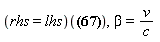
and remove  and and  from the formulation using from the formulation using
|
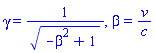
|
(71) |

|
![Lambda[`~μ`, nu] = Matrix(%id = 36893488153289646316)](/view.aspx?sf=218129_post/8a9ecc2e51419e76d9294e8a51550c6f.gif)
|
(72) |


|

|
| |
References
|
| |
[1] J.D. Jackson, "Classical Electrodynamics", third edition, 1999.
[2] L.D. Landau, E.M. Lifshitz, "The Classical Theory of Fields", Course of Theoretical Physics V.2, 4th revised English edition, 1975.
|

|






