|
Vibrational modes of multi-span Euler-Bernoulli beams
through Krylov-Dunction functions
Rouben Rostamian
2020-07-19
Note: Maple defines the imaginary unit  . We want to use the . We want to use the
symbol  as the beam's cross-sectional moment of inertia. as the beam's cross-sectional moment of inertia.
Therefore we redefine the imaginary unit (for which we have no
use) as  and free up the symbol and free up the symbol  for our use. for our use.
| > |
interface(imaginaryunit=II):
|
| |
The Euler-Bernoulli beam equation
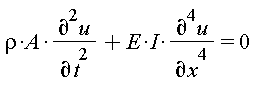 . .
|
| |
We wish to determine the natural modes of vibration of
a possibly multi-span Euler-Bernoulli beam.
Separate the variables by setting  . We get . We get
-

whence
 . .
Let 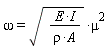 . Then . Then

and

The idea behind the Krylov-Duncan technique is to express 
in terms an alternative (and equivalent) set of basis
functions  through through  ,, as ,, as
 , ,
where the functions  through through  are defined in the next section. are defined in the next section.
In some literature the symbols  , are used for these , are used for these
functions but I find it more sensible to use the indexed function
notation.
The Krylov-Duncan approach is particularly effective in formulating
and finding a multi-span beam's natural modes of vibration.
|
| |
The Krylov-Duncan functions
|
| |
The K[i](x) defined by this proc evaluates to the  th th
Krylov-Duncan function.
Normally the index  will be in the set will be in the set , however the proc is , however the proc is
set up to accept any integer index (positive or negative). The proc evaluates
the index modulo 4 to bring the index into the set  . For . For
instance, K[5](x) and K[-3](x)i are equivalent to K[1](x) .
| > |
K := proc(x)
local n := op(procname);
if not type(n, integer) then
return 'procname'(args);
else
n := 1 + modp(n-1,4); # reduce n modulo 4
end if;
if n=1 then
(cosh(x) + cos(x))/2;
elif n=2 then
(sinh(x) + sin(x))/2;
elif n=3 then
(cosh(x) - cos(x))/2;
elif n=4 then
(sinh(x) - sin(x))/2;
else
error "shouldn't be here!";
end if;
end proc:
|
Here are the Krylov-Duncan basis functions:
| > |
seq(print(cat(`K__`,i)(x) = K[i](x)), i=1..4);
|
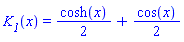
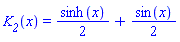
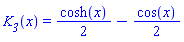
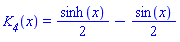
and here is what they look like. All grow exponentially for large 
but are significantly different near the origin.
| > |
plot([K[i](x) $i=1..4], x=-Pi..Pi,
color=["red","Green","blue","cyan"],
thickness=2,
legend=['K[1](x)', 'K[2](x)', 'K[3](x)', 'K[4](x)']);
|

The cyclic property of the derivatives:
We have  . Let's verify that: . Let's verify that:
| > |
diff(K[i](x),x) - K[i-1](x) $i=1..4;
|

The fourth derivative of each  function equals itself. This is a consequence of the cyclic property: function equals itself. This is a consequence of the cyclic property:
| > |
diff(K[i](x), x$4) - K[i](x) $ i=1..4;
|

The essential property of the Krylov-Duncan basis function is that their
zeroth through third derivatives at  form a basis for form a basis for  : :
| > |
seq((D@@n)(K[1])(0), n=0..3);
seq((D@@n)(K[2])(0), n=0..3);
seq((D@@n)(K[3])(0), n=0..3);
seq((D@@n)(K[4])(0), n=0..3);
|


As noted earlier, in the case of a single-span beam, the modal shapes
are expressed as
 . .
Then, due to the cyclic property of the derivatives of the Krylov-Duncan
functions, we see that:
 . .
 . .
 . .
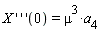
Let us note, in particular, that
 , ,
 , ,
 , ,
 . .
|
| |
A general approach for solving multi-span beams
|
| |
In a multi-span beam, we write  for the deflection of the for the deflection of the  th span, where th span, where
 and where and where  is the span's length. The is the span's length. The  coordinate indicates the coordinate indicates the
location within the span, with  corresponding to the span's left endpoint. corresponding to the span's left endpoint.
Thus, each span has its own  coordinate system. coordinate system.
We assume that the interface of the two adjoining spans is supported on springs
which (a) resist transverse displacement proportional to the displacement (constant of
proportionality of  (d for displacement), and (b) resist rotation proportional to the (d for displacement), and (b) resist rotation proportional to the
slope (constant of proportionality of  (t for torsion or twist). The spans are numbered (t for torsion or twist). The spans are numbered
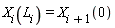
from left to right. The interface conditions between spans  and and  +1 are +1 are
| 1. |
The displacements at the interface match:
 . .
|
| 2. |
The slopes at the interface match
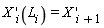 (0). (0).
|
| 3. |
The difference of the moments just to the left and just to the right of the
support is due to the torque exerted by the torsional spring:

|
| 4. |
The difference of the shear forces just to the left and just to the right of the
support is due to the force exerted by the linear spring:

|
The special case of a pinned support corresponds to  and and  . .
In that case, condition 3 above implies that  , ,
and condition 4 implies that 
Let us write the displacements  and and  in terms of the Krylov-Duncan in terms of the Krylov-Duncan
functions as:


Then applying the cyclic properties of the Krylov-Duncan functions described
earlier, the four interface conditions translate to the following system of four
equations involving the eight coefficients  . .

 , ,


which we write as a matrix equation
 . .
That  coefficient matrix plays a central role in solving coefficient matrix plays a central role in solving
for modal shapes of multi-span beams. Let's call it  . .
Note that the value of  enters that matrix only in combinations with enters that matrix only in combinations with
 and and  . Therefore we introduce the new symbols . Therefore we introduce the new symbols
 , ,  . .
The following proc generates the matrix  . The parameters . The parameters  and and 
are optional and are assigned the default values of infinity and zero, which
corresponds to a pinned support.
The % sign in front of each Krylov function makes the function inert, that is, it
prevents it from expanding into trig functions. This is so that we can
see, visually, what our expressions look like in terms of the  functions. To functions. To
force the evaluation of those inert function, we will apply Maple's value function,
as seen in the subsequent demos.
| > |
M_interface := proc(mu, L, {Kd:=infinity, Kt:=0})
local row1, row2, row3, row4;
row1 := %K[1](mu*L), %K[2](mu*L), %K[3](mu*L), %K[4](mu*L), -1, 0, 0, 0;
row2 := %K[4](mu*L), %K[1](mu*L), %K[2](mu*L), %K[3](mu*L), 0, -1, 0, 0;
row3 := %K[3](mu*L), %K[4](mu*L), %K[1](mu*L), %K[2](mu*L), 0, Kt/mu, -1, 0;
if Kd = infinity then
row4 := 0, 0, 0, 0, 1, 0, 0, 0 ;
else
row4 := %K[2](mu*L), %K[3](mu*L), %K[4](mu*L), %K[1](mu*L), Kd/mu^3, 0, 0, -1;
end if:
return < <row1> | <row2> | <row3> | <row4> >^+;
end proc:
|
Here is the interface matrix for a pinned support:
, (1, 2) = %K[2](L*mu), (1, 3) = %K[3](L*mu), (1, 4) = %K[4](L*mu), (1, 5) = -1, (1, 6) = 0, (1, 7) = 0, (1, 8) = 0, (2, 1) = %K[4](L*mu), (2, 2) = %K[1](L*mu), (2, 3) = %K[2](L*mu), (2, 4) = %K[3](L*mu), (2, 5) = 0, (2, 6) = -1, (2, 7) = 0, (2, 8) = 0, (3, 1) = %K[3](L*mu), (3, 2) = %K[4](L*mu), (3, 3) = %K[1](L*mu), (3, 4) = %K[2](L*mu), (3, 5) = 0, (3, 6) = 0, (3, 7) = -1, (3, 8) = 0, (4, 1) = 0, (4, 2) = 0, (4, 3) = 0, (4, 4) = 0, (4, 5) = 1, (4, 6) = 0, (4, 7) = 0, (4, 8) = 0})](/view.aspx?sf=213083_post/db36d7fc270e827af352da1f1f7373bc.gif)
And here is the interface matrix for a general springy support:
| > |
M_interface(mu, L, 'Kd'=a, 'Kt'=b);
|
, (1, 2) = %K[2](L*mu), (1, 3) = %K[3](L*mu), (1, 4) = %K[4](L*mu), (1, 5) = -1, (1, 6) = 0, (1, 7) = 0, (1, 8) = 0, (2, 1) = %K[4](L*mu), (2, 2) = %K[1](L*mu), (2, 3) = %K[2](L*mu), (2, 4) = %K[3](L*mu), (2, 5) = 0, (2, 6) = -1, (2, 7) = 0, (2, 8) = 0, (3, 1) = %K[3](L*mu), (3, 2) = %K[4](L*mu), (3, 3) = %K[1](L*mu), (3, 4) = %K[2](L*mu), (3, 5) = 0, (3, 6) = b/mu, (3, 7) = -1, (3, 8) = 0, (4, 1) = %K[2](L*mu), (4, 2) = %K[3](L*mu), (4, 3) = %K[4](L*mu), (4, 4) = %K[1](L*mu), (4, 5) = a/mu^3, (4, 6) = 0, (4, 7) = 0, (4, 8) = -1})](/view.aspx?sf=213083_post/c70a0951626d7f5279aa95071cee2cfe.gif)
Note: In Maple's Java interface, inert quantities are shown in gray.
Note: The  in this matrix is the length of the span to the left of the interface. in this matrix is the length of the span to the left of the interface.
Recall that it is  , not , not  , in the derivation that leads to that matrix. , in the derivation that leads to that matrix.
In a beam consisting of  spans, we write the spans, we write the  th span's deflection th span's deflection  as as

Solving the beam amounts to determining the  unknowns unknowns 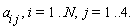
which we order as

At each of the  interface supports we have a set of four equations as derived interface supports we have a set of four equations as derived
above, for a total of  equations. Additionally, we have four user-supplied equations. Additionally, we have four user-supplied
boundary conditions -- two at the extreme left and two at the extreme right of the
overall beam. Thus, altogether we have  equations which then we solve for the equations which then we solve for the

unknown coefficients  . .
The user-supplied boundary conditions at the left end are two equations, each in the
form of a linear combination of the coefficients 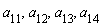 . We write . We write  for the for the
 coefficient matrix of that set of equations. Similarly, the user-supplied boundary coefficient matrix of that set of equations. Similarly, the user-supplied boundary
conditions at the right end are two equations, each in the form of a linear combination
of the coefficients 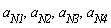 . We write . We write  for the for the  coefficient matrix of coefficient matrix of
that set of equations. Putting these equations together with those obtained at the interfaces,
we get a linear set of equations represented by a  matrix matrix  which can be assembled which can be assembled
easily from the matrices  , and , and  . In the case of a 4-span beam the . In the case of a 4-span beam the
assembled  matrix matrix  looks like this: looks like this:

The pattern generalizes to any number of spans in the obvious way.
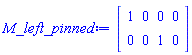
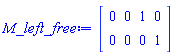
For future use, here we record a few frequently occurring  and and  matrices. matrices.
| > |
M_left_pinned := <
1, 0, 0, 0;
0, 0, 1, 0 >;
|
| > |
M_right_pinned := (mu,L) -> <
%K[1](mu*L), %K[2](mu*L), %K[3](mu*L), %K[4](mu*L);
%K[3](mu*L), %K[4](mu*L), %K[1](mu*L), %K[2](mu*L) >;
|
, %K[2](L*mu), %K[3](L*mu), %K[4](L*mu)), `<|>`(%K[3](L*mu), %K[4](L*mu), %K[1](L*mu), %K[2](L*mu))) end proc](/view.aspx?sf=213083_post/cb87793321e7cf345f18238ea1c17234.gif)
| > |
M_left_clamped := <
1, 0, 0, 0;
0, 1, 0, 0 >;
|

| > |
M_right_clamped := (mu,L) -> <
%K[1](mu*L), %K[2](mu*L), %K[3](mu*L), %K[4](mu*L);
%K[4](mu*L), %K[1](mu*L), %K[2](mu*L), %K[3](mu*L) >;
|
, %K[2](L*mu), %K[3](L*mu), %K[4](L*mu)), `<|>`(%K[4](L*mu), %K[1](L*mu), %K[2](L*mu), %K[3](L*mu))) end proc](/view.aspx?sf=213083_post/536d618fd3a993c9d92ed245667547f3.gif)
| > |
M_left_free := <
0, 0, 1, 0;
0, 0, 0, 1 >;
|
| > |
M_right_free := (mu,L) -> <
%K[3](mu*L), %K[4](mu*L), %K[1](mu*L), %K[2](mu*L);
%K[2](mu*L), %K[3](mu*L), %K[4](mu*L), %K[1](mu*L) >;
|
, %K[4](L*mu), %K[1](L*mu), %K[2](L*mu)), `<|>`(%K[2](L*mu), %K[3](L*mu), %K[4](L*mu), %K[1](L*mu))) end proc](/view.aspx?sf=213083_post/4bb8bbdb09431cc68519fec00fe29b74.gif)
The following proc builds the overall matrix in the general case. It takes in the general case. It takes
two or three arguments. The first two arguments are the  matrices matrices
which are called  and and  in the discussion above. If the beam in the discussion above. If the beam
consists of a single span, that's all the information that need be supplied.
There is no need for the third argument.
In the case of a multi-span beam, in the third argument we supply the
list of the interface matrices  , as in , as in ![[M__1, M__2, () .. ()]](/view.aspx?sf=213083_post/db96496561b603d690616da5588b1ade.gif) , listed in order , listed in order
of the supports, from left to right. An empty list is also
acceptable and is interpreted as having no internal supports,
i.e., a single-span beam.
| > |
build_matrix := proc(left_bc::Matrix(2,4), right_bc::Matrix(2,4), interface_matrices::list)
local N, n, i, M;
# n is the number of internal supports
n := 0;
# adjust n if a third argument is supplied
if _npassed = 3 then
n := nops(interface_matrices);
if n > 0 then
for i from 1 to n do
if not type(interface_matrices[i], 'Matrix(4,8)') then
error "expected a 4x8 matrix for element %1 in the list of interface matrices", i;
end if;
end do;
end if;
end if;
N := n + 1; # number of spans
M := Matrix(4*N);
M[1..2, 1..4] := left_bc;
for i from 1 to n do
M[4*i-1..4*i+2, 4*i-3..4*i+4] := interface_matrices[i];
end do;
M[4*N-1..4*N, 4*N-3..4*N] := right_bc;
return M;
end proc:
|
For instance, for a single-span cantilever beam of length  we get the following we get the following  matrix: matrix:
| > |
build_matrix(M_left_clamped, M_right_free(mu,L));
|
, (3, 2) = %K[4](L*mu), (3, 3) = %K[1](L*mu), (3, 4) = %K[2](L*mu), (4, 1) = %K[2](L*mu), (4, 2) = %K[3](L*mu), (4, 3) = %K[4](L*mu), (4, 4) = %K[1](L*mu)})](/view.aspx?sf=213083_post/0782048dea1c47c892c4be190fa4f17e.gif)
For a two-span beam with with span lengths of  and and  , and all three , and all three
supports pinned, we get the following  matrix: matrix:
| > |
build_matrix(M_left_pinned, M_right_pinned(mu,L[2]), [M_interface(mu, L[1])]);
|
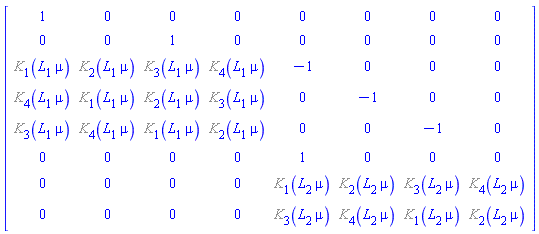
The matrix  represents a homogeneous linear system (i.e., the right-hand side vector represents a homogeneous linear system (i.e., the right-hand side vector
is zero.) To obtain a nonzero solution, we set the determinant of  equal to zero. equal to zero.
That gives us a generally transcendental equation in the single unknown  . Normally . Normally
the equation has infinitely many solutions. We call these 
Remark: In the special case of pinned supports at the interfaces, that is, when
 , the matrix , the matrix  depends only on the span lengths depends only on the span lengths  . .
It is independent of the parameters  that enter the Euler-Bernoulli that enter the Euler-Bernoulli
equations. The frequencies 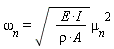 , however, depend on those parameters. , however, depend on those parameters.
This proc plots the calculated modal shape corresponding to the eigenvalue  . .
The params argument is a set of equations which define the numerical values
of all the parameters that enter the problem's description, such as the span
lengths.
It is assumed that in a multi-span beam, the span lengths are named !["L[1], L[2],"](/view.aspx?sf=213083_post/6f476df5caf1b82fdd183dd88e163b00.gif) etc., etc.,
and in a single-span beam, the length is named  . .
| > |
plot_beam := proc(M::Matrix,mu::realcons, params::set)
local null_space, N, a_vals, i, j, A, B, P;
eval(M, params);
eval(%, :-mu=mu);
value(%); #print(%);
null_space := NullSpace(%); #print(%);
if nops(null_space) <> 1 then
error "Calculation failed. Increasing Digits and try again";
end if;
N := Dimension(M)[1]/4; # number of spans
a_vals := convert([seq(seq(a[i,j], j=1..4), i=1..N)] =~ null_space[1], list);
if N = 1 then
eval(add(a[1,j]*K[j](mu*x), j=1..4), a_vals);
P[1] := plot(%, x=0..eval(L,params));
else
A := 0;
B := 0;
for i from 1 to N do
B := A + eval(L[i], params);
eval(add(a[i,j]*K[j](mu*x), j=1..4), a_vals);
eval(%, x=x-A):
P[i] := plot(%, x=A..B);
A := B;
end do;
unassign('i');
end if;
plots:-display([P[i] $i=1..N]);
end proc:
|
|
| |
A single-span pinned-pinned beam
|
| |
Here we calculate the natural modes of vibration of a single span
beam, pinned at both ends. The modes are of the form

The matrix  is: is:
| > |
M := build_matrix(M_left_pinned, M_right_pinned(mu,L));
|
, (3, 2) = %K[2](L*mu), (3, 3) = %K[3](L*mu), (3, 4) = %K[4](L*mu), (4, 1) = %K[3](L*mu), (4, 2) = %K[4](L*mu), (4, 3) = %K[1](L*mu), (4, 4) = %K[2](L*mu)})](/view.aspx?sf=213083_post/eafae5202abf2c19d7e676991b5db658.gif)
The characteristic equation:
| > |
Determinant(M);
eq := simplify(value(%)) = 0;
|
^2+%K[4](L*mu)^2](/view.aspx?sf=213083_post/c9f305cea48caa87c19311a48823a5f8.gif)

| > |
solve(eq, mu, allsolutions);
|

We conclude that the eigenvalues are 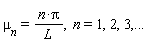 . .
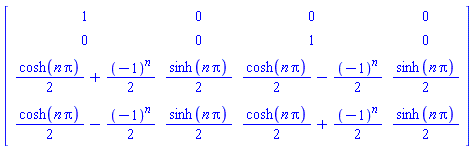
A non-trivial solution of the system  is in the null-space of is in the null-space of  : :
| > |
eval(value(M), mu=n*Pi/L) assuming n::integer;
N := NullSpace(%);
|
}](/view.aspx?sf=213083_post/23be68d9cd0fe5f44addc3be523d7f88.gif)
Here are the weights that go with the Krylov functions:
| > |
a_vals := convert([a[1,j] $j=1..4] =~ N[1], set);
|
![{a[1, 1] = 0, a[1, 2] = -1, a[1, 3] = 0, a[1, 4] = 1}](/view.aspx?sf=213083_post/faf63602292167001448c3d59236d107.gif)
and here is the deflection:
| > |
add(a[1,j]*K[j](mu*x), j=1..4);
eval(%, a_vals); # plug in the a_vals calculated above
eval(%, mu=n*Pi/L); # assert that n is an integer
|
![a[1, 1]*((1/2)*cosh(mu*x)+(1/2)*cos(mu*x))+a[1, 2]*((1/2)*sinh(mu*x)+(1/2)*sin(mu*x))+a[1, 3]*((1/2)*cosh(mu*x)-(1/2)*cos(mu*x))+a[1, 4]*((1/2)*sinh(mu*x)-(1/2)*sin(mu*x))](/view.aspx?sf=213083_post/93c203280c50337a25b3b6a2f65696ed.gif)


We see that the shape functions are simple sinusoids.
|
| |
A single-span free-free beam
|
| |
Here we calculate the natural modes of vibration of a single span
beam, free at both ends. The modes are of the form
 . .
The reasoning behind the calculations is very similar to that in the
previous section, therefore we don't comment on many details.
| > |
M := build_matrix(M_left_free, M_right_free(mu,L));
|
, (3, 2) = %K[4](L*mu), (3, 3) = %K[1](L*mu), (3, 4) = %K[2](L*mu), (4, 1) = %K[2](L*mu), (4, 2) = %K[3](L*mu), (4, 3) = %K[4](L*mu), (4, 4) = %K[1](L*mu)})](/view.aspx?sf=213083_post/5c2c5db94e020ea00bd4f9905f1a9582.gif)
The characteristic equation:
| > |
Determinant(M);
simplify(value(%)) = 0;
eq_tmp := isolate(%, cos(L*mu));
|
^2-%K[2](L*mu)*%K[4](L*mu)](/view.aspx?sf=213083_post/bfee12653408d879b5d98e0da4055fd2.gif)
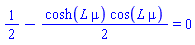
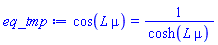
Let  . Then the characteristic equation takes the form . Then the characteristic equation takes the form
| > |
eq := algsubs(L*mu=lambda, eq_tmp);
|
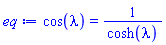
Here are the graphs of the two sides of the characteristic equation:
| > |
plot([lhs,rhs](eq), lambda=0..4*Pi, color=["red","Green"]);
|

The first three roots are:
| > |
lambda__1, lambda__2, lambda__3 :=
fsolve(eq, lambda=Pi/2..4*Pi, maxsols=3);
|


| > |
mu__1, mu__2, mu__3 := (lambda__1, lambda__2, lambda__3) /~ eval(L, params);
|

| > |
plots:-display([
plot_beam(M, mu__1, params),
plot_beam(M, mu__2, params),
plot_beam(M, mu__3, params)],
color=["red","Green","blue"],
legend=[mode1, mode2, mode3]);
|

|
| |
A single-span clamped-free cantilever
|
| |
We have a cantilever beam of length  . It is clamped at the . It is clamped at the
left end, and free at the right end.
| > |
M := build_matrix(M_left_clamped, M_right_free(mu,L));
|
, (3, 2) = %K[4](L*mu), (3, 3) = %K[1](L*mu), (3, 4) = %K[2](L*mu), (4, 1) = %K[2](L*mu), (4, 2) = %K[3](L*mu), (4, 3) = %K[4](L*mu), (4, 4) = %K[1](L*mu)})](/view.aspx?sf=213083_post/754459aac8ae6dcb23deccc1e736776c.gif)
| > |
Determinant(M);
simplify(value(%)) = 0;
eq_tmp := isolate(%, cos(L*mu));
|
^2-%K[2](L*mu)*%K[4](L*mu)](/view.aspx?sf=213083_post/f8dd7b7fb996a27030aa28871d6277e6.gif)
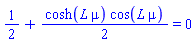

Let  . Then the characteristic equation takes the form . Then the characteristic equation takes the form
| > |
eq := algsubs(L*mu=lambda, eq_tmp);
|
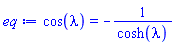
Here are the graphs of the two sides of the characteristic equation:
| > |
plot([lhs,rhs](eq), lambda=0..3*Pi, color=["red","Green"]);
|

| > |
lambda__1, lambda__2, lambda__3 :=
fsolve(eq, lambda=Pi/2..3*Pi, maxsols=3);
|


| > |
mu__1, mu__2, mu__3 := (lambda__1, lambda__2, lambda__3) /~ eval(L, params);
|

| > |
plots:-display([
plot_beam(M, mu__1, params),
plot_beam(M, mu__2, params),
plot_beam(M, mu__3, params)],
color=["red","Green","blue"],
legend=[mode1, mode2, mode3]);
|

|
| |
A dual-span pinned-pinned-free cantilever beam
|
| |
We have a two-span beam of span lengths  and and  , with the left end of the , with the left end of the
first span pinned, the right end of the second span free, and the interface
between the spans on a pinned support. .
| > |
M := build_matrix(
M_left_pinned,
M_right_free(mu,L[2]),
[ M_interface(mu,L[1])] );
|
, (3, 2) = %K[2](L[1]*mu), (3, 3) = %K[3](L[1]*mu), (3, 4) = %K[4](L[1]*mu), (3, 5) = -1, (3, 6) = 0, (3, 7) = 0, (3, 8) = 0, (4, 1) = %K[4](L[1]*mu), (4, 2) = %K[1](L[1]*mu), (4, 3) = %K[2](L[1]*mu), (4, 4) = %K[3](L[1]*mu), (4, 5) = 0, (4, 6) = -1, (4, 7) = 0, (4, 8) = 0, (5, 1) = %K[3](L[1]*mu), (5, 2) = %K[4](L[1]*mu), (5, 3) = %K[1](L[1]*mu), (5, 4) = %K[2](L[1]*mu), (5, 5) = 0, (5, 6) = 0, (5, 7) = -1, (5, 8) = 0, (6, 1) = 0, (6, 2) = 0, (6, 3) = 0, (6, 4) = 0, (6, 5) = 1, (6, 6) = 0, (6, 7) = 0, (6, 8) = 0, (7, 1) = 0, (7, 2) = 0, (7, 3) = 0, (7, 4) = 0, (7, 5) = %K[3](L[2]*mu), (7, 6) = %K[4](L[2]*mu), (7, 7) = %K[1](L[2]*mu), (7, 8) = %K[2](L[2]*mu), (8, 1) = 0, (8, 2) = 0, (8, 3) = 0, (8, 4) = 0, (8, 5) = %K[2](L[2]*mu), (8, 6) = %K[3](L[2]*mu), (8, 7) = %K[4](L[2]*mu), (8, 8) = %K[1](L[2]*mu)})](/view.aspx?sf=213083_post/8341eded9653b27825209a489dd1597d.gif)
The characteristic equation:
| > |
Determinant(M);
eq_tmp1 := simplify(value(%)) = 0;
|
^2*%K[4](L[2]*mu)*%K[2](L[2]*mu)-%K[4](L[1]*mu)^2*%K[1](L[2]*mu)^2-%K[4](L[1]*mu)*%K[1](L[1]*mu)*%K[4](L[2]*mu)*%K[1](L[2]*mu)+%K[4](L[1]*mu)*%K[1](L[1]*mu)*%K[3](L[2]*mu)*%K[2](L[2]*mu)+%K[4](L[2]*mu)*%K[1](L[2]*mu)*%K[3](L[1]*mu)*%K[2](L[1]*mu)-%K[4](L[2]*mu)*%K[2](L[2]*mu)*%K[2](L[1]*mu)^2+%K[1](L[2]*mu)^2*%K[2](L[1]*mu)^2-%K[3](L[2]*mu)*%K[2](L[2]*mu)*%K[3](L[1]*mu)*%K[2](L[1]*mu)](/view.aspx?sf=213083_post/330770d0caf6363814a11693aab862f8.gif)
![(1/4)*(-cos(L[1]*mu)*sinh(L[2]*mu)*cos(L[2]*mu)+cos(L[1]*mu)*sin(L[2]*mu)*cosh(L[2]*mu)+2*sin(L[1]*mu)*cosh(L[2]*mu)*cos(L[2]*mu)+2*sin(L[1]*mu))*sinh(L[1]*mu)+(1/4)*sin(L[1]*mu)*cosh(L[1]*mu)*(sinh(L[2]*mu)*cos(L[2]*mu)-sin(L[2]*mu)*cosh(L[2]*mu)) = 0](/view.aspx?sf=213083_post/329c16b3a566992aac04656f7b5a0c5a.gif)
That equation does not seem to be amenable to simplification. The special case of  , however, , however,
is much nicer:
| > |
eval(eq_tmp1, {L[1]=L, L[2]=L}):
eq_tmp2 := simplify(%*4);
|

Let  : :
| > |
eq_tmp3 := algsubs(L*mu=lambda, eq_tmp2);
|

That expression grows like  , so we divide through by that to obtain , so we divide through by that to obtain
a better-behaved equation
| > |
eq := eq_tmp3/cosh(lambda)^2;
|

| > |
plot(lhs(eq), lambda=0..2*Pi);
|

Here are the first three roots:
| > |
lambda__1, lambda__2, lambda__3 :=
fsolve(eq, lambda=1e-3..2*Pi, maxsols=3);
|

| > |
params := { L[1]=1, L[2]=1 };
|
![{L[1] = 1, L[2] = 1}](/view.aspx?sf=213083_post/e9773dea09da4bf3994dd7b616ca6252.gif)
| > |
mu__1, mu__2, mu__3 := (lambda__1, lambda__2, lambda__3) /~ eval(L[1], params);
|

| > |
plots:-display([
plot_beam(M, mu__1, params),
plot_beam(M, mu__2, params),
plot_beam(M, mu__3, params)],
color=["red","Green","blue"],
legend=[mode1, mode2, mode3]);
|

|
| |
A dual-span clamped-pinned-free cantilever beam
|
| |
We have a two-span beam of span lengths  and and  , with the left end of the , with the left end of the
first span clamped, the right end of the second span free, and the interface
between the spans on a pinned support. This is different from the previous
case only in the nature of the left boundary condition.
| > |
M := build_matrix(
M_left_clamped,
M_right_free(mu,L[2]),
[ M_interface(mu,L[1])] );
|
, (3, 2) = %K[2](L[1]*mu), (3, 3) = %K[3](L[1]*mu), (3, 4) = %K[4](L[1]*mu), (3, 5) = -1, (3, 6) = 0, (3, 7) = 0, (3, 8) = 0, (4, 1) = %K[4](L[1]*mu), (4, 2) = %K[1](L[1]*mu), (4, 3) = %K[2](L[1]*mu), (4, 4) = %K[3](L[1]*mu), (4, 5) = 0, (4, 6) = -1, (4, 7) = 0, (4, 8) = 0, (5, 1) = %K[3](L[1]*mu), (5, 2) = %K[4](L[1]*mu), (5, 3) = %K[1](L[1]*mu), (5, 4) = %K[2](L[1]*mu), (5, 5) = 0, (5, 6) = 0, (5, 7) = -1, (5, 8) = 0, (6, 1) = 0, (6, 2) = 0, (6, 3) = 0, (6, 4) = 0, (6, 5) = 1, (6, 6) = 0, (6, 7) = 0, (6, 8) = 0, (7, 1) = 0, (7, 2) = 0, (7, 3) = 0, (7, 4) = 0, (7, 5) = %K[3](L[2]*mu), (7, 6) = %K[4](L[2]*mu), (7, 7) = %K[1](L[2]*mu), (7, 8) = %K[2](L[2]*mu), (8, 1) = 0, (8, 2) = 0, (8, 3) = 0, (8, 4) = 0, (8, 5) = %K[2](L[2]*mu), (8, 6) = %K[3](L[2]*mu), (8, 7) = %K[4](L[2]*mu), (8, 8) = %K[1](L[2]*mu)})](/view.aspx?sf=213083_post/f8b7032ef1b9ebc3004e5ec397efb7d0.gif)
The characteristic equation:
| > |
Determinant(M);
eq_tmp1 := simplify(value(%)) = 0;
|
*%K[4](L[1]*mu)*%K[4](L[2]*mu)*%K[1](L[2]*mu)-%K[2](L[1]*mu)*%K[4](L[1]*mu)*%K[3](L[2]*mu)*%K[2](L[2]*mu)+%K[2](L[1]*mu)*%K[3](L[1]*mu)*%K[4](L[2]*mu)*%K[2](L[2]*mu)-%K[2](L[1]*mu)*%K[3](L[1]*mu)*%K[1](L[2]*mu)^2-%K[1](L[1]*mu)*%K[4](L[1]*mu)*%K[4](L[2]*mu)*%K[2](L[2]*mu)+%K[1](L[1]*mu)*%K[4](L[1]*mu)*%K[1](L[2]*mu)^2-%K[3](L[1]*mu)^2*%K[4](L[2]*mu)*%K[1](L[2]*mu)+%K[3](L[1]*mu)^2*%K[3](L[2]*mu)*%K[2](L[2]*mu)](/view.aspx?sf=213083_post/932b61612a3f98f495e49c3da3f7169c.gif)
![(1/4)*((-cos(L[1]*mu)*sin(L[2]*mu)-sin(L[1]*mu)*cos(L[2]*mu))*cosh(L[2]*mu)+cos(L[1]*mu)*sinh(L[2]*mu)*cos(L[2]*mu)-sin(L[1]*mu))*cosh(L[1]*mu)+(1/4)*(sinh(L[1]*mu)*cos(L[1]*mu)*cos(L[2]*mu)+sin(L[2]*mu))*cosh(L[2]*mu)+(1/4)*sinh(L[1]*mu)*cos(L[1]*mu)-(1/4)*sinh(L[2]*mu)*cos(L[2]*mu) = 0](/view.aspx?sf=213083_post/677eac765b7dd66a37aca889a41f7906.gif)
That equation does not seem to be amenable to simplification. The special case of  , however, , however,
is much nicer:
| > |
eval(eq_tmp1, {L[1]=L, L[2]=L}):
eq_tmp2 := simplify(%*4);
|

Let  : :
| > |
eq_tmp3 := algsubs(L*mu=lambda, eq_tmp2);
|

That expression grows like  , so we divide through by that to obtain , so we divide through by that to obtain
a better-behaved equation
| > |
eq := eq_tmp3/cosh(lambda)^2;
|

| > |
plot(lhs(eq), lambda=0..2*Pi);
|

Here are the first three roots:
| > |
lambda__1, lambda__2, lambda__3 :=
fsolve(eq, lambda=1e-3..2*Pi, maxsols=3);
|

| > |
params := { L[1]=1, L[2]=1 };
|
![{L[1] = 1, L[2] = 1}](/view.aspx?sf=213083_post/90a75cf3277b820372a517584136cbdd.gif)
| > |
mu__1, mu__2, mu__3 := (lambda__1, lambda__2, lambda__3) /~ eval(L[1], params);
|

| > |
plots:-display([
plot_beam(M, mu__1, params),
plot_beam(M, mu__2, params),
plot_beam(M, mu__3, params)],
color=["red","Green","blue"],
legend=[mode1, mode2, mode3]);
|

|
| |
A triple-span free-pinned-pinned-free beam
|
| |
We have a triple-span beam with span lengths of  . The beam is supported . The beam is supported
on two internal pinned supports. The extreme ends of the beam are free.
The graphs of the first three modes agree with those
in Figure 3.22 on page 70 of the 2007 article of
Henrik Åkesson, Tatiana Smirnova, Thomas Lagö, and Lars Håkansson.
In the caption of Figure 2.12 on page 28 the span lengths are given
as  3.5, 3.5,  5.0, 5.0,  21.5. 21.5.
| > |
interface(rtablesize=12):
|
| > |
M := build_matrix(
M_left_free,
M_right_free(mu,L[3]),
[ M_interface(mu,L[1]), M_interface(mu,L[2])] );
|
, (3, 2) = %K[2](L[1]*mu), (3, 3) = %K[3](L[1]*mu), (3, 4) = %K[4](L[1]*mu), (3, 5) = -1, (3, 6) = 0, (3, 7) = 0, (3, 8) = 0, (3, 9) = 0, (3, 10) = 0, (3, 11) = 0, (3, 12) = 0, (4, 1) = %K[4](L[1]*mu), (4, 2) = %K[1](L[1]*mu), (4, 3) = %K[2](L[1]*mu), (4, 4) = %K[3](L[1]*mu), (4, 5) = 0, (4, 6) = -1, (4, 7) = 0, (4, 8) = 0, (4, 9) = 0, (4, 10) = 0, (4, 11) = 0, (4, 12) = 0, (5, 1) = %K[3](L[1]*mu), (5, 2) = %K[4](L[1]*mu), (5, 3) = %K[1](L[1]*mu), (5, 4) = %K[2](L[1]*mu), (5, 5) = 0, (5, 6) = 0, (5, 7) = -1, (5, 8) = 0, (5, 9) = 0, (5, 10) = 0, (5, 11) = 0, (5, 12) = 0, (6, 1) = 0, (6, 2) = 0, (6, 3) = 0, (6, 4) = 0, (6, 5) = 1, (6, 6) = 0, (6, 7) = 0, (6, 8) = 0, (6, 9) = 0, (6, 10) = 0, (6, 11) = 0, (6, 12) = 0, (7, 1) = 0, (7, 2) = 0, (7, 3) = 0, (7, 4) = 0, (7, 5) = %K[1](L[2]*mu), (7, 6) = %K[2](L[2]*mu), (7, 7) = %K[3](L[2]*mu), (7, 8) = %K[4](L[2]*mu), (7, 9) = -1, (7, 10) = 0, (7, 11) = 0, (7, 12) = 0, (8, 1) = 0, (8, 2) = 0, (8, 3) = 0, (8, 4) = 0, (8, 5) = %K[4](L[2]*mu), (8, 6) = %K[1](L[2]*mu), (8, 7) = %K[2](L[2]*mu), (8, 8) = %K[3](L[2]*mu), (8, 9) = 0, (8, 10) = -1, (8, 11) = 0, (8, 12) = 0, (9, 1) = 0, (9, 2) = 0, (9, 3) = 0, (9, 4) = 0, (9, 5) = %K[3](L[2]*mu), (9, 6) = %K[4](L[2]*mu), (9, 7) = %K[1](L[2]*mu), (9, 8) = %K[2](L[2]*mu), (9, 9) = 0, (9, 10) = 0, (9, 11) = -1, (9, 12) = 0, (10, 1) = 0, (10, 2) = 0, (10, 3) = 0, (10, 4) = 0, (10, 5) = 0, (10, 6) = 0, (10, 7) = 0, (10, 8) = 0, (10, 9) = 1, (10, 10) = 0, (10, 11) = 0, (10, 12) = 0, (11, 1) = 0, (11, 2) = 0, (11, 3) = 0, (11, 4) = 0, (11, 5) = 0, (11, 6) = 0, (11, 7) = 0, (11, 8) = 0, (11, 9) = %K[3](L[3]*mu), (11, 10) = %K[4](L[3]*mu), (11, 11) = %K[1](L[3]*mu), (11, 12) = %K[2](L[3]*mu), (12, 1) = 0, (12, 2) = 0, (12, 3) = 0, (12, 4) = 0, (12, 5) = 0, (12, 6) = 0, (12, 7) = 0, (12, 8) = 0, (12, 9) = %K[2](L[3]*mu), (12, 10) = %K[3](L[3]*mu), (12, 11) = %K[4](L[3]*mu), (12, 12) = %K[1](L[3]*mu)})](/view.aspx?sf=213083_post/19b6c558b7837d19cd7a94e52daf27cb.gif)
| > |
params := { L[1]=3.5, L[2]=5.0, L[3]=21.5 };
|
![{L[1] = 3.5, L[2] = 5.0, L[3] = 21.5}](/view.aspx?sf=213083_post/372fbdde7c40d8ea5347fa38358bfd1a.gif)
The characteristic equation
| > |
simplify(Determinant(M)):
value(%):
eq := simplify(eval(%, params));
|
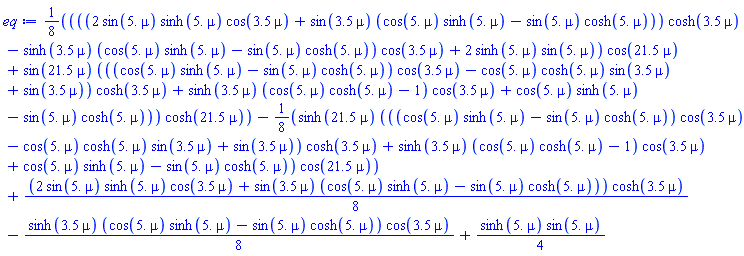

That graphs grows much too fast to be useful. We moderate it by dividing through
the fastest growing cosh term:
| > |
plot(eq/cosh(21.5*mu), mu=0..0.4);
|

Here are the first three roots:
| > |
mu__1, mu__2, mu__3 := fsolve(eq, mu=1e-3..0.4, maxsols=3);
|

| > |
plots:-display([
plot_beam(M, mu__1, params),
plot_beam(M, mu__2, params),
plot_beam(M, mu__3, params)],
color=["red","Green","blue"],
legend=[mode1, mode2, mode3]);
|

|
| |
A triple-span free-spring-spring-free beam
|
| |
We have a triple-span beam with span lengths of  . The beam is supported . The beam is supported
on two internal springy supports. The extreme ends of the beam are free.
The numerical data is from the worksheet posted on July 29, 2020 at
https://www.mapleprimes.com/questions/230085-Elasticfoundation-Multispan-EulerBernoulli-Beamthreespan#comment271586
The problem is pretty much the same as the one in the previous section, but the
pinned supports have been replaced by spring supports.
This section's calculations require a little more precision than
Maple's default of 10 digits:

| > |
interface(rtablesize=12):
|
| > |
M := build_matrix(M_left_free, M_right_free(mu,L[3]),
[ M_interface(mu, L[1], 'Kd'=kd/(E*I), 'Kt'=kt/(E*I)),
M_interface(mu, L[2], 'Kd'=kd/(E*I), 'Kt'=kt/(E*I)) ]);
|
, (3, 2) = %K[2](L[1]*mu), (3, 3) = %K[3](L[1]*mu), (3, 4) = %K[4](L[1]*mu), (3, 5) = -1, (3, 6) = 0, (3, 7) = 0, (3, 8) = 0, (3, 9) = 0, (3, 10) = 0, (3, 11) = 0, (3, 12) = 0, (4, 1) = %K[4](L[1]*mu), (4, 2) = %K[1](L[1]*mu), (4, 3) = %K[2](L[1]*mu), (4, 4) = %K[3](L[1]*mu), (4, 5) = 0, (4, 6) = -1, (4, 7) = 0, (4, 8) = 0, (4, 9) = 0, (4, 10) = 0, (4, 11) = 0, (4, 12) = 0, (5, 1) = %K[3](L[1]*mu), (5, 2) = %K[4](L[1]*mu), (5, 3) = %K[1](L[1]*mu), (5, 4) = %K[2](L[1]*mu), (5, 5) = 0, (5, 6) = -I*kt/(E*mu), (5, 7) = -1, (5, 8) = 0, (5, 9) = 0, (5, 10) = 0, (5, 11) = 0, (5, 12) = 0, (6, 1) = %K[2](L[1]*mu), (6, 2) = %K[3](L[1]*mu), (6, 3) = %K[4](L[1]*mu), (6, 4) = %K[1](L[1]*mu), (6, 5) = -I*kd/(E*mu^3), (6, 6) = 0, (6, 7) = 0, (6, 8) = -1, (6, 9) = 0, (6, 10) = 0, (6, 11) = 0, (6, 12) = 0, (7, 1) = 0, (7, 2) = 0, (7, 3) = 0, (7, 4) = 0, (7, 5) = %K[1](L[2]*mu), (7, 6) = %K[2](L[2]*mu), (7, 7) = %K[3](L[2]*mu), (7, 8) = %K[4](L[2]*mu), (7, 9) = -1, (7, 10) = 0, (7, 11) = 0, (7, 12) = 0, (8, 1) = 0, (8, 2) = 0, (8, 3) = 0, (8, 4) = 0, (8, 5) = %K[4](L[2]*mu), (8, 6) = %K[1](L[2]*mu), (8, 7) = %K[2](L[2]*mu), (8, 8) = %K[3](L[2]*mu), (8, 9) = 0, (8, 10) = -1, (8, 11) = 0, (8, 12) = 0, (9, 1) = 0, (9, 2) = 0, (9, 3) = 0, (9, 4) = 0, (9, 5) = %K[3](L[2]*mu), (9, 6) = %K[4](L[2]*mu), (9, 7) = %K[1](L[2]*mu), (9, 8) = %K[2](L[2]*mu), (9, 9) = 0, (9, 10) = -I*kt/(E*mu), (9, 11) = -1, (9, 12) = 0, (10, 1) = 0, (10, 2) = 0, (10, 3) = 0, (10, 4) = 0, (10, 5) = %K[2](L[2]*mu), (10, 6) = %K[3](L[2]*mu), (10, 7) = %K[4](L[2]*mu), (10, 8) = %K[1](L[2]*mu), (10, 9) = -I*kd/(E*mu^3), (10, 10) = 0, (10, 11) = 0, (10, 12) = -1, (11, 1) = 0, (11, 2) = 0, (11, 3) = 0, (11, 4) = 0, (11, 5) = 0, (11, 6) = 0, (11, 7) = 0, (11, 8) = 0, (11, 9) = %K[3](L[3]*mu), (11, 10) = %K[4](L[3]*mu), (11, 11) = %K[1](L[3]*mu), (11, 12) = %K[2](L[3]*mu), (12, 1) = 0, (12, 2) = 0, (12, 3) = 0, (12, 4) = 0, (12, 5) = 0, (12, 6) = 0, (12, 7) = 0, (12, 8) = 0, (12, 9) = %K[2](L[3]*mu), (12, 10) = %K[3](L[3]*mu), (12, 11) = %K[4](L[3]*mu), (12, 12) = %K[1](L[3]*mu)})](/view.aspx?sf=213083_post/19e6ec6b3b9b4a0f5425f0b5bbfcb817.gif)
Calculate the determinant of  . The result is quite large, so we terminate the command . The result is quite large, so we terminate the command
with a colon so that not to have to look at the result. If we bothered to peek, however, we
will see that the determinant has a factor of  . But that quite obvious by looking at the . But that quite obvious by looking at the
entries of the matrix shown above. Two of its rows have  in them and another two have in them and another two have
 . When multiplied, they produce the overall factor of . When multiplied, they produce the overall factor of  . .
Here are the parameters that the determinant depends on:
| > |
indets(DET, name); # the parameters that make up M
|
![{E, I, kd, kt, mu, L[1], L[2], L[3]}](/view.aspx?sf=213083_post/cedbd6aad0931fa029d7eb1a38f21133.gif)
So we provide values for those parameters:
| > |
params := {
L[1]=3.5, L[2]=5.0, L[3]=21.5,
kd=4.881e9, kt=1.422e4,
E = 2.05e11, I = 1.1385e-7 };
|
![{E = 0.205e12, I = 0.11385e-6, kd = 0.4881e10, kt = 0.1422e5, L[1] = 3.5, L[2] = 5.0, L[3] = 21.5}](/view.aspx?sf=213083_post/25fe51ce7f9e175f541ee4001127b5ef.gif)
Here is the characteristic equation. We multiply it by  to remove the singularity at to remove the singularity at 
| > |
mu^8 * value(DET):
eq := eval(%, params):
|

We can't see anything useful in that graph. Let's limit the vertical range:
| > |
plot(eq, mu=0..0.6, view=-1e8..1e8);
|

| > |
mu__1, mu__2, mu__3 := fsolve(eq, mu=1e-3..0.6, maxsols=3);
|

| > |
plots:-display([
plot_beam(M, mu__1, params),
plot_beam(M, mu__2, params),
plot_beam(M, mu__3, params)],
color=["red","Green","blue"],
legend=[mode1, mode2, mode3]);
|

| > |
Digits := 10; # restore the default
|

|
|






